Top 20 Proven Solutions That Are Sure To Make Your Startup Successful
January 7, 2017

Top 20 Proven Solutions That Are Sure To Make Your Startup Successful

Read More

As there are millions of new startups emerge these days, it looks quite clear that each startup has to face a stiff competition in the market. To survive in this ever-evolving market, it becomes highly essential for businesses to be abreast with the latest technology and advancements. By taking a proper approach to the PR activities and marketing, one can succeed in maintaining his position among his competitors.

All credit goes to the new technology that has made things easier for the businesses to survive in their fields. Though the competition is definitely high, yet there are great solutions that are there to help startups to grow and build up as a successful entrepreneur. In this article, we present you with top 20 amazing services that are the real boon to the startups as they help to grow them and achieving their targets in a respective segment.

1. HARO โ€“ (Help A Reporter Out) โ€“

HARO

When you seek solutions or services that help your startup company to grow, we suggest HARO as the best online service to go with. It encourages the entrepreneurs to provide the online journalists with their practiced view regarding their market or segment. It is a wonderful service for those who want the online journalists to find them from the web as HARO does that for you.

To start taking benefit of HARO, you just have to sign up as the source and it will start sending you 3 emails every day. These emails include some great opportunities according to your expertise and experience. On finding anything worth your attention, you simply need to click on it and follow further simple directions.

There are numerous journalists available and if any one of them likes your opinion, he would allow you to connect and can share the necessary information to him or her. The best advantage of this service is; it lists the company and name in the article which is created by the journalist in your contact. In lucky instances, the article can link back to your own site as well.

Get effective slution to grow website visitors with Stellen Infotech!

2. Meltwater โ€“

Meltwater

According to the PR perspective, the Meltwater is a great service that startups can take advantage of. Though to get the great benefits out of this service, you should concentrate on its media monitoring features. With a power to be updated with the numerous blog, social media discussions, and editorials, Meltwater makes it quite simple for its users to join any relevant conversation with a flow. In addition, this service allows the users to easily pinpoint the editors or journalists related to the industry your company belongs to. Thus, you get a clear idea about who is good to be reached out to grow in the future.

Build-up a unique social identity with social media marketing services with Stellen Infotech!

3. Anewstip โ€“

Anewstip

The great media contacts is another contributing factor in the growth of a startup. Though finding relevant contacts is not a cup of tea for all. But, using Anewstip you can easily find the great contacts of journalists or other media personnel. It makes the job of creating a relevant email list for these contacts such an easy thing for users. Thus, Anewstip is such a brilliant service for growing the startups.

Get an answer to your start-up business queries from our friendly customer support!

4. Cision โ€“

Cision

Cision is a great service that helps boosting the PR campaign in an effective manner. It covers every aspect that one needs for a successful PR campaign. Cision has a huge and impressive database comprising of around 1.6 million online journalists, influencers, and editors that are actually a great thing for a startup. The most notable features of Cision are tracking performance tools, mention tracking tools, and advanced distribution tools for

Cision provides tracking performance tools, mention tracking tools, and advanced distribution tools for press release.
It accompanies all tools to check various PR activities on following platforms and in different forms like social media, briefings of daily news, print media, video and broadcast and online media.

Present your start-up business in front of your target audience with a custom build website!

5. Duct Tape โ€“ To Instantly Create Marketing Press Release โ€“

Duct Tape Marketing

To write professional looking and impressive press release for your startup, the use of Duct Tape Marketing service is highly recommended. It covers all the required aspects that contribute to creating an effective press release for a company. It is basically a press-release creating service that accompanies some helpful tools which are used to make eye-catchy press releases, that too instantly.

Stellen Infotech ensures your early success on different PR and social media channels.

6. GrowthHackers โ€“

GrowthHackers

When you look for highly effective services for growing your startup business, GrowthHackers can prove to be an excellent solution for you. It delivers exceptionally advantageous resources to bring growth to a business. Choosing the services of GrowthHackers, you get a chance to be a part of its huge network that comprises of millions of growth professionals and make influential collaboration with them that will surely help you rising. Take great business ideas from them or share your own to them and thus, develop great business resources and connections for your startup.

For the best growth hacking solutions and strategies, contact Stellen Infotech.

7. Stellan Infotech โ€“

Stellen Infotech Ltd

Stellan Infotech is one of the most influential services that help start-ups grow in their respective field. The company provides IT solutions to all types of businesses that help them rising rapidly. As this company works as the service and marketing partner of many leading businesses, entrepreneurs have a great faith in the effectiveness of Stellan Infotech services and solutions.

Contact Stellen Infotech for custom mobile & web app development services!

8. Withoomph โ€“

Withoomph

When you start a company, you need to create a website, banners, and logo that gives a unique identity to your brand. So, Logo designing is one of the most important steps for a startup on which you may have to spend a good amount of money and time. But, when you have a service like Withoomph, you donโ€™t need to spend that much money and time on this job as it allows the users to make attractive logos quickly and affordably.

Let us help you design a professional looking Start-up e-commerce website!

9. Docracy โ€“

Docracy

Docracy is an exclusive service that almost every startup should subscribe to. It is a different service as compared to other marketing or PR services, but it is more effective than others. Docracy features a huge open collection for legal contracts that startups would require at different stages. Be it an employment contract or a partnership contract, Docracy can avail you every type of contracts written in the best way to make things clearer and well-presented for your startup. So, join the services of Docracy and get the contract that you need for your business operations.

Get a free legal quote for sStart-up custom build website services!

10. Canva โ€“

Canva

Canva is a fantastic service that allows the bloggers to make simple yet attractive graphic designs for their blogs. As of now, there are more than 10 million subscribers who are taking benefit of Canva as it has made designing a way simpler than before. Due to the simple interface and great features of this solution, anyone can try his skills as a designer. So, join the Canva community and learn and grow your startup with your creative designing skills.

Design the future of your Start-up business with a custom designed WordPress website!

11. Quick Sprout โ€“

Quick Sprout

This service is phenomenal for startups as it provides truly helpful marketing guides as well as website analysis that enables one to keep a check on the growth of his company. Discovering your fallouts or getting the right analysis of your website is a great way to make an appropriate strategy to grow your business. So, Quick Sprout holds a great significance for startup companies.

Get tips to generate traffic & build a better website!

12. Buzzsumo โ€“

Buzzsumo

Buzzsumo works dynamically to check the best performing content on the web. It checks which is the best article or post available on the internet related to your niche and competitors. Thus, keep the users updated about the new internet trends. Following Buzzsumo is such a fruitful strategy to grow your startup in the direction you want.

Stellen Infotech provides start-ups with creative content marketing strategies.

13. GTMetrix โ€“

GTMetric

This service is beneficial in terms of SEO as it checks the speed and performance of a web page for a company. A web page speed matters a lot as Google gives much preference to the websites which loads faster and performs well. So, GTMetric gives you a right insight about how your website works and thus, make you aware of if you should seek any remedy to enhance its performance or not.

Quality SEO service is what you need to rank on top of Google!

14. Sumome List Builder โ€“

Sumome List Builder

When you seek services to grow your new business, a solution that helps you growing your network is something that should be tried out. Sumome List Builder is a service that fulfills this purpose as it provides several email addresses of people who belong to the field you work in. So, subscribe to this service and enjoy growing your network by collecting numerous email addresses to send your marketing emails and newsletters to them.

Convert your website visitors into leads & your leads into customers with Stellen Infotech!

15. Medium โ€“

Medium

This service is valuable in terms of PR as it helps one to share his experiences and story to others. This way, your story reaches to millions of people and this is how Medium makes you popular among the masses. Sharing an influential story about your profession or success is such a wonderful thing for a startup and can turn to be an unexpectedly huge reward for you.

Having a tailor-made website is the right medium to improve your start-up business!

16. Invoice To Me โ€“

Invoice to Me

When you are starting a company, your main focus should be on minimizing your expenses as much as you can. Hiring a person who handles your invoices will surely increase the expenses that you have to bear. But, when you have services like Invoice to Me, you can save your money that you spend on hiring a resource who handles your invoices. So, get these services and enjoy making invoices for the vendors, suppliers, clients or anyone a fun task.

Reduce website development cost by hiring dedicated CMS developers!

17. Slack โ€“

Slack

When you have social profiles on different social media platforms, it becomes essential for you to keep a track on whatโ€™s going on over all of them. However, checking each platform one by one can make things messy for you. Though for a new startup, it is vital to keep a closer eye on these platforms as they bring business to them. So, to manage the communication of different social media platforms easily, Slack is a phenomenal service to grab on.

Application maintenance service is all you need to keep your application run smoothly.

18. Primer โ€“

Primer

A service by Google, Primer is one of the most helpful solutions that can be greatly advantageous for startups. You must agree on the fact that to earn a good name in any business, you should have some skills. By installing the Primer app on your device, you can develop required business skills that help you growing in your respective field. For any business, the knowledge of advertising and marketing comes at first and Primer focuses on delivering that knowledge to its subscribers.

Read latest industry news & google updates to keep your website ahead of competitors!

19. Wave โ€“

Wave

It is a great service that helps the startups to make invoices and accounting. There are so many things related to finance that you can manage by using Wave. The best thing about this service is that; it comes for free.

Cash-in extra profit and sales with a custom-designed Android app!

20. Email 1K โ€“

Email 1K

Email 1K is an online course service that focuses on growing the contacts and email list for businesses. The course tenure is for 30 days in which you will be an expert in growing your contacts as it helps to double the email list of the startup companies.

Contact us for an expert plan to improve your business contacts and customer reach.

Conclusion โ€“

So, these are top 20 awesome services for growing your startup and all of these are sure to skyrocket the success of your new company. Therefore, just grab these services and start experiencing your business growth.


A Step-by-Step Guide to Getting Started With Laravel Framework
December 3, 2016

A Step-by-Step Guide to Getting Started With Laravel 13 Framework

Read More

Laravel remains the most widely used PHP framework for building web applications, APIs, and increasingly AI-powered products, thanks to its Laravel AI SDK. If you’re evaluating Laravel framework development for a project or just want to understand how it works before you brief a development team, this guide walks through the full MVC request cycle from installing Laravel to rendering your first page using the current Laravel 13 release.

Laravel is a PHP web framework built on the MVC (Model-View-Controller) pattern. To get started: install PHP 8.3+ and Composer, run laravel new your-app, then build out a Model, Migration, Controller, Route, and Blade View for each resource in your application.

What You Need Before You Start

  • PHP 8.3 or higher (Laravel 13’s minimum requirement)
  • Composer (PHP’s dependency manager)
  • A database โ€” MySQL, PostgreSQL, or SQLite (SQLite ships as the zero-config default for new projects)
  • The Laravel installer: composer global require laravel/installer

How Laravel’s MVC Pattern Works

Laravel is built on MVC architecture, which separates an application into three responsibilities:

  • Models: talk to the database and represent your data as PHP objects (Eloquent ORM).
  • Views: the Blade templates that render HTML back to the user.
  • Controllers: sit in between; they receive requests, ask a model for data, and hand that data to a view.
  • Routes: map an incoming URL to the controller action that should handle it.

The Request Lifecycle

  1. Request: a user hits a URL in your app.
  2. Route: routes/web.php matches that URL to a controller action.
  3. Controller: the action asks the relevant Model for data, then passes it to a View.
  4. View: Blade renders the final HTML response.

Step 1: Install Laravel

bash

composer global require laravel/installer
laravel new blog-app
cd blog-app
php artisan serve

The installer will prompt you to choose a starter kit (React, Vue, Livewire, or API-only), a testing framework (Pest is the default suggestion in 13.x), and a database. Since Laravel 11, the application skeleton is intentionally minimal. There’s no separate Kernel.php anymore; middleware, routing, and exception handling are all configured in bootstrap/app.php.

Step 2: Create a Model and Migration

Use Artisan, Laravel’s built-in CLI, to scaffold a model with a migration in one command:

bash

php artisan make:model Post --migration

This generates app/Models/Post.php and a migration file under database/migrations/. In Laravel 13 you can define table configuration either the traditional way or with the newer attribute syntax:

php

// Traditional property syntax (still fully supported)
class Post extends Model
{
    protected $table = 'posts';
    protected $fillable = ['title', 'body', 'published_at'];
}

php

// New in Laravel 13: attribute syntax
#[Table('posts')]
class Post extends Model
{
    protected $fillable = ['title', 'body', 'published_at'];
}

Then define your table columns in the migration and run it:

php

Schema::create('posts', function (Blueprint $table) {
    $table->id();
    $table->string('title');
    $table->text('body');
    $table->timestamp('published_at')->nullable();
    $table->timestamps();
});

bash

php artisan migrate

Step 3: Create a Resource Controller

Laravel treats a data type like Post as a resource, with a controller that handles the standard CRUD actions (index, create, store, show, edit, update, destroy):

bash

php artisan make:controller PostController --resource --model=Post

Using --model=Post also type-hints the model into each method automatically via route model binding, so you skip manual Post::find($id) lookups in most cases.

Step 4: Register Routes

In routes/web.php:

php

use App\Http\Controllers\PostController;

Route::resource('posts', PostController::class);

That single line generates all seven RESTful routes:

MethodURIActionRoute Name
GET/postsindexposts.index
GET/posts/createcreateposts.create
POST/postsstoreposts.store
GET/posts/{post}showposts.show
GET/posts/{post}/editeditposts.edit
PUT/PATCH/posts/{post}updateposts.update
DELETE/posts/{post}destroyposts.destroy

Step 5: Build the Show Action

With route model binding, the controller method receives the already-resolved model, so no manual lookup is required:

php

public function show(Post $post)
{
    return view('posts.show', compact('post'));
}

Step 6: Build the Blade View

Create resources/views/posts/show.blade.php:

blade

<!DOCTYPE html>
<html>
<head>
    <title>{{ $post->title }}</title>
</head>
<body>
    <h1>{{ $post->title }}</h1>
    <p>{{ $post->body }}</p>
    <small>Published: {{ $post->published_at?->format('M d, Y') }}</small>
</body>
</html>

Blade’s {{ }} syntax auto-escapes output for you, compiling down to <?php echo e($post->title); ?> behind the scenes, which protects you from XSS by default.

Step 7: Test It

Laravel 13 defaults new projects to Pest for testing. A quick feature test for the route above:

php

it('shows a single post', function () {
    $post = Post::factory()->create();

    $this->get(route('posts.show', $post))
        ->assertOk()
        ->assertSee($post->title);
});

bash

php artisan test

Frequently Asked Questions

Is Laravel still relevant in 2026? Yes. Laravel 13 is under active development with a stable release cadence, a production-ready AI SDK, and one of the largest PHP job markets and package ecosystems (Packagist/Composer) of any framework.

What PHP version does Laravel need in 2026? Laravel 13 requires PHP 8.3 or later. Laravel 12 (PHP 8.2 minimum) continues to receive security fixes until February 2027 if you’re maintaining an existing app.

Do I need to know PHP before learning Laravel? Yes. Laravel is a PHP framework, so a working knowledge of PHP fundamentals (OOP, namespaces, Composer) will make this guide much easier to follow.

What’s the difference between Laravel and plain PHP? Laravel provides routing, an ORM (Eloquent), templating (Blade), authentication, queues, and testing tooling out of the box, replacing hundreds of hours of boilerplate you’d otherwise write by hand in plain PHP.

Should I hire a Laravel developer or build it myself? For a learning project or small internal tool, this guide is enough to get moving. For production applications with security, scaling, or timeline requirements, working with an experienced Laravel development team is usually faster and safer.

Final Thoughts

The MVC flow hasn’t fundamentally changed since Laravel’s early versions. Model, Migration, Controller, Route, View is still the backbone of every Laravel app. What has changed is the tooling around it: PHP 8.3, a leaner skeleton, attribute-based configuration, and first-party AI and testing tooling. If you’d rather have this built for you than build it yourself, talk to our Laravel development team about your project.

Top Practices Of QA For Mobile & Web Applications To Deliver Software Fast!
November 21, 2016

Top Practices Of QA For Mobile & Web Applications To Deliver Software Fast!

Read More

In software designing and development, a number of Application development companies these days prefer the idea of QA outsourcing. It is a deep practice that ensures the smooth functionality of the software and application developed.

QA which is an abbreviated term for Quality Assurance includes thorough testing of the application and software which has recently been developed. As QA for mobile applications and QA for web applications ensure flawlessness of the developed product and gives the software or application a green signal to be launched in the market, it becomes highly mandatory to get QA done by an expert. It is a reason people like the idea of QA outsourcing, if they donโ€™t have an expert quality assurance team.

As QA for mobile as well as QA for web applications is a long process to manage, you may have to spend several hours without stopping, if you donโ€™t follow right practices. Here are top practices of QA for mobile applications and web applications that help to manage workload and ensure the highest quality standard of the product that gets approved for launch.

Breaking Out Classical Duties Of QA

breaking-out-classical-duties-of-qa

Start QA with breaking limitations in both areas. Think from the customer perspective as well as conduct active design discussion with your team as well. Check with customers about the issue they face and expected features in a product they want. On another side, engage your team in design related discussion and give feedback taken from the customers. Additionally, using code testing expertise, discover design issues before employing anyone on coding. This practice will help to reduce unnecessary development cycles as well as helps meeting the expectations of the customers from the new product.

Select The Release Criteria Smartly

Select The Release Criteria Smartly

Testing every feature of every release in the enterprise product is just not possible and the best thing is; you donโ€™t have to do it. But, you can get confidence in your approved product by focusing on aspects of the code where the critical changes had been introduced. Before the latest release cycle resumes, the QA team should meet up the product owner to learn those parts of their product which have to be polished with updated code. So, if you already perceive something that was worked on the previous release and you donโ€™t want to work on it again, then just donโ€™t think of it as it will waste your time. So, make the new code your base of release criteria that is going to be added.

Give Priority To Bug Fixes As Per The Usage

fix-all-the-bugs

In QA for mobile applications and QA for web applications, bug fixes are the most important aspect; however, it is equally important to consider which bugs need more effort from you. So, we suggest usage data needs much consideration from you. For instance, if you already know the least useable part of an app or software and a bug in that area of the code would receive low priority as compared to the bug in the areas which are in high usage.

Use Two-Tier Test Automation Approach For Testing

aaeaaqaaaaaaaazraaaajgy1otaxzdnllwnkn2etngnkos1hntcylwzknwninmnkmdjlyq

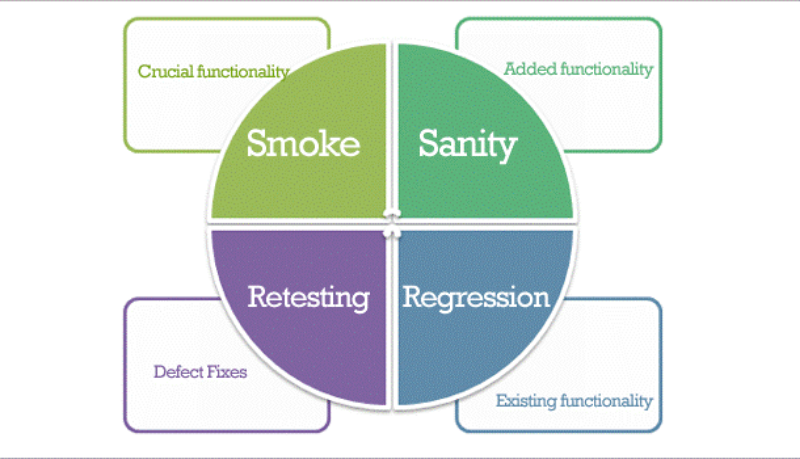
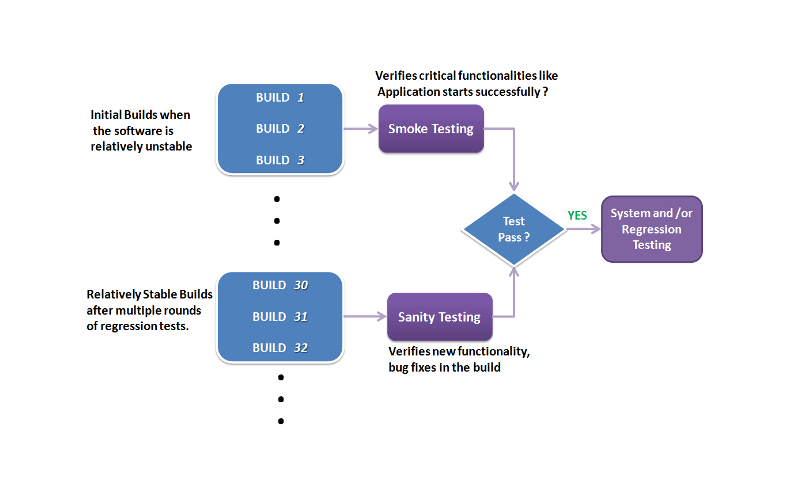
Using two-tier test automation approach, you can manage QA in a better way. When you adopt the two-tier approach, then tier one would be targeted by a commit to a code base and hence, delivers faster validation of changes made by an expert developer with effective sanity tests. To complete sanity tests, developers often spend several minutes. Tier two is highly exhaustive regression test which runs at night automatically when one can concentrate on other parts related to QA for web applications. So, when you fall into this approach, you get to learn the way to balance between night-time regression and day-time sanity QA testing.

Stay Connected With A Relevant Environment

206112388

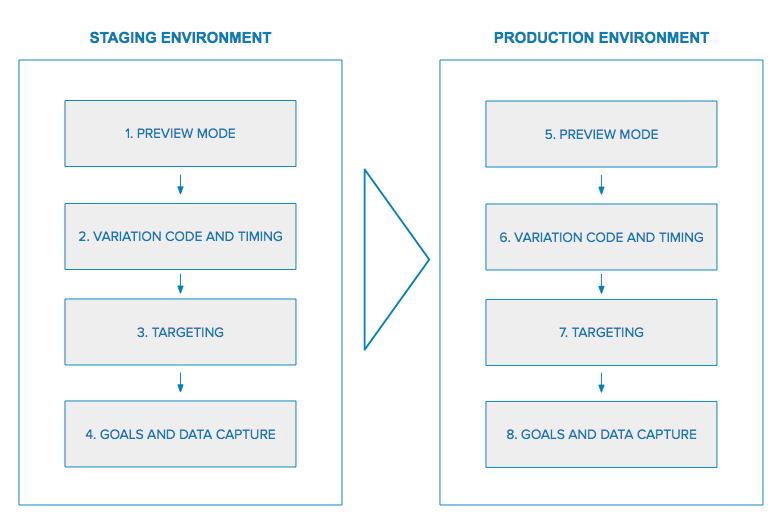
The entire team of QA should work in the same environment. Once, the builds shift to the development phase, one must evaluate the code within production conditions. Thus, a powerful staging environment can be built that would help to stimulate the production environments of the customers.

Build A Devoted Team For Security Testing

drupal-security-team

Before every single release of products like software as a service that is SaaS, it is mandatory to conduct a thorough security testing and if you find any security vulnerabilities, try to correct it before they are being noticed by customers because such issues often drive away the users. For this purpose, trying building up a testing team to perform a complete penetration testing over a stable version of new products to be released and updates.

A Quality Team Of Performance Testing Is Must

a-quality-team-of-performance-testing-is-must

To conduct performance testing of a stable product, a quality team is a must. Before, they conduct testing, brief the features and new versions of the product to that team. It will help them assessing the performance risks of the product. The features which do not affect the performance only need to undergo regressing tests. Though for the performance-related feature, there should be a certain performance test criteria that has to be followed while accomplishing the performance test of those features.

Conduct The Regression Cycle

conduct-the-regression-cycle

When your product stabilization process reaches its final stage, you should conduct the regression cycle. After successfully qualifying for this phase, a product gets a green signal to move to production. Although, at this level, very few changes are required, yet it gives a chance to validate the whole product. There are different methods to conduct regression cycle in which one is the traffic light approach. In this approach, if all branches get the green signal, a product is referred to as ready to deliver. Though if any branch gets a yellow signal, a discussion is made with the stakeholders. Ultimately, if there is a red signal, the work is being stopped and that issue is being addressed immediately.

Conduct Sanity Tests For Production

conduct-sanity-tests-for-production


After the release, sanity tests should be performed on the production account which helps to validate if every feature is in sound condition. First, the tests can be performed on the current production account; however later, you can make a new account to authenticate the flawless functionality of the process for new customers. So, give enough time for sanity testing in which, spend time on existing accounts as well as on new accounts. At last, check third-party components like billing system which determines version compatibility.

Conclusion

There are few top QA for web applications and QA for mobile applications that you should follow if you want to ensure flawless delivery of the product. Just bear in mind that to sustain the quality of a product while maintaining the demand of recent product releases, a good QA team must breach conventional molds. Developing new ideas and skills, you can involve in varied development stages. These practices are win-win for any development team.

Top 15 Websites Powered by WordPress
June 14, 2016

Top 15 Websites Powered by WordPress

Read More

It won’t be an understatement to call WordPress as the best self-hosted website creation tool, which powers millions of diverse types of websites.
Once regarded as merely a blogging system, WordPress has quickly gained a lot of popularity and become a fully developed Content Management System for professional developers and businesses.

Yet many still think it as a platform for personal use and amateurs.

To put the record straight, we’ve have compiled a list of top websites that are built using WordPress to show you exactly what this open source platform is capable of.

1. The Walt Disney Company

The Walt Disney Company

Who isn’t familiar with The Walt Disney? The best childhood friend of almost every kid, The Walt Disney Company’s aim is to become the world’s biggest providers of information and entertainment.
The site has clearly been developed to put visuals simple while focusing on the quality content that rendering best possible information about the company. Browsing across different pages of the website, you will notice high-quality images embellished with quality content which look incredible on both desktop and mobile devices.

2. Angry Birds

Angry Birds

Whether you are an adult or 9-year old kids, you definitely have played Angry Birds at least once. You can either love’em or hate’em, well, I fall into the former category. Developed and launched by Rovio in 2009, Angry Birds has become an international mobile game that has bagged the title of the most downloaded game of all time.
Over the years, it has gained a lot of popularity and evolved into a movie along with an official website built on WordPress. The official website features animation, games, and characters. The usage of bright colors justifies the nature of Angry Birds game. Also, despite using high-resolution images, the website loads in seconds.

3. Katy Perry

Katy Perry

Huge celebrities create sites using WordPress too and why not? It’s simple to use, reduces development costs and offers easier administration.
Katy Perry happens to be one of the most popular celebrities that uses WordPress website.
Featuring beautiful parallax scrolling effects, the website is the perfect example of integrating this trend without overdoing. Aside scrolling effect, social media plays an important role too where you are allowed to join this pop star on any social media platform.

4. NASA

NASA

NASA, a United States Government State Agency, has also chosen WordPress as their core software to build websites. A recent VIP case study conducted by WordPress dot com revealed that NASA is a huge fan of WordPress and preferred using it to host a range of sites that has an objective to assist federal agencies to render more collaboration, participation and transparency.

Different sites hosted by NASA include code.nasa.gov, data.nasa.gov, and open.nasa.gov. However, the main website of NASA i.e. NASA.gov is not powered by WordPress.

5. Forbes

Forbes

Forbes is a popular source for reliable financial information and business news that uses WordPress to show off its updates and latest information.
The website has accurately used the concept of Content Management System by integrating popular features of WordPress into its website including social sharing buttons, featured posts, related posts and so much more.

6. Flickr Blog

Flickr Blog

Next up in our list of popular WordPress powered website is Yahoo’s huge photo-sharing platform, Flikr.
Since Flikr is all about high-resolution images, it absolutely makes sense that they are well-focused on the blog. The Flickr Blog features a featured post with a full-width featured image at the top, joined by the most recent posts.

7. Bata

Bata

Bata is a family owned international fashion accessory and footwear manufacturer and retailer with headquarters based in Lausanne, Switzerland. Being available in more than 70 countries, Bata has gained a lot of trust and credibility over the years.
To add to the existing phenadip.com credibility, Bata used WordPress to build a website that reflects their brand and their business aim. Upon clicking products, you can witness well-crafted loading animation that does not let their visitors abandon their website.

8. Time Inc.

Time Inc

Time Inc. Is yet another popular news and entertainment resource that publish an array of magazines, including InStyle, Fortune, and Time. Most of the publications are managed on WordPress, however, each publication maintains its individual style with the help of dozens fo customization options available in WordPress.

9. TechCrunch

TechCrunch

TechCrunch is a great example for showing how powerful versatile WordPress can be. Founded by Nico Vincent and Alex Khadiwala, TechCrunch is a content-oriented website whose main aim is to render useful information across the web. The main content area is divided into two sections โ€“ Latest and Popular where you will witness a timeline integrated beautifully that displays updates and news according to time and hours.
The site also has leverages many other WordPress features and/or plugins to bring out the best in the site.

10. News Corp

News Corp

News Corp, another popular network of leading companies across information services, education, and news, has boastfully used WordPress to reach out to their audience. Not only News Corp but also various other properties of it are making use of WordPress including The Times, New York Post and The Wall Street Journal.

11. Beyonce

Beyonce

Similar to Katy Pery, Beyonce hasn’t lagged behind in the race to join the league of WordPress users. The official website of Beyonce shows how customizable and diverse the platform is and how to make the most of it. Beyonce’s site assisted her present her story to her millions of fans with a beautiful collage of high-resolution images offering a unique experience for fans and visitors.

12. Chicago Weather Center

Chicago Weather Center


While catering to specific visitors, WGN’s Chicago Weather Center exemplifies seamless integration of collective elements within its software. Witness the site changing on scrolling over few graphs and maps. Sporting a card layout on the left, the site elegantly displays news and updates with images promptly, no waiting required.

13. LinkedIn

LinkedIn

While you might spend much time on LinkedIn for its features like posting, sharing, and communicating, did you realize it’s powered by WordPress? Well, I am quite sure, a majority of you didn’t. But that’s why we are here.
LinkedIn’s official blog is a great source of information and insights about this social media site.
The website focuses on article descriptions and visuals just like site’s main feed. LinkedIn received much praise for its design approach, mirroring homepage tones and colors, earning it considerable acclaim.

14. Sony Music Entertainment

Sony Music Entertainment

Sony Music Entertainment, owned by Sony Corporation of America, uses a WordPress site to showcase artists like Michael Jackson, Usher, Sia, and Brad Paisley. With a minimalist design yet rich functionality, Sony engages its audience and directs focus to artists, avoiding unnecessary distractions. Another attention-grabbing aspect is its use of images, with artists’ pictures covering 2/3rd of the space above the fold.
Sony also features popular music and videos below the fold.

15. Google Ventures

Google Ventures, a popular venture capital investment arm of Google also uses WordPress powered website. The company created an easy template that many business owners find simple to use when browsing the website.

The website also leverages WordPress features and plugins in the best possible way including newsletters and micro-sites.

How to use WordPress to Build a Web App?
April 22, 2016

How to use WordPress to Build a Web App?

Read More

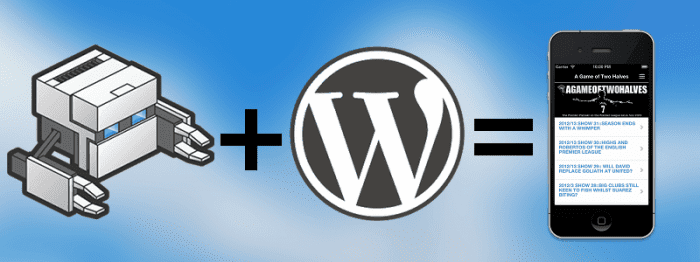
The State Of The Word presentation delivered by Matt Mullenweg was quite perceptive of what WordPress was to offer in the coming years. One thing was very clearly mentioned in the presentation โ€“ WordPress powered apps.

As a matter of fact, more than 24.7% of webmasters are using WordPress, and certainly almost every site owner wants a mobile app too. Since they are running WordPress powered websites, it makes absolute sense to have WordPress powered apps so that whenever the website is updated, the app is simultaneously updated too.

For example, if you run a news website, you would indeed want you published articles to be available immediately in the app too. Similarly, if you make any changes to the website, you would want the same changed to be applied to the app without having to repeat the all the changes in the app.

There are various ways to build apps today including third party CMS, MVVM structure, and MVC Model. However, if you are using WordPress to build your website, why not use it to build an app? WP has its own unique architecture to manage data, but these concepts can be taken and used separately to build something of your own.

WP users are habitual of using themes and plugins to tweak the appearance as well as the functionality of their websites, and these do not always work well with a mobile app. This apparently brings few unique challenges in the way of a developer when approached by a client who is looking to get a mobile app developed out of his/her WordPress website.

WP is a great platform to get started, thanks to a wide range of APIs offered to leverage. It comes with content types, sanitisation, user roles, authentication and so much more. Moreover, if you are building a huge app, you would not even have to worry about the user interface, taxonomies, meta boxes and image gallery.

Does your business need a mobile app?

Well, having a mobile-friendly version of your website may seem quite enough to target mobile users and drive traffic from mobile. But that’s not enough. Until and unless you are running a casual blog on WordPress.com, your business needs a mobile app regardless of its type, size and length. Mobile users today prefer using mobile apps over mobile-friendly websites which make it quite a necessary tool to target your mobile audience.

  • A mobile app assists your target users to get your content faster than a mobile-friendly website.
  • These apps can also provide a certain amount of content offline as well
  • Can be used to send push notifications to the users
  • These mobile apps make the most of the mobile features including contacts, camera, and geolocation
  • It also offers better user experience and user interface.
  • According to recent statistics, mobile users spend more time on mobile apps than on mobile web and features such as push notifications can offer better user engagement than web pages.

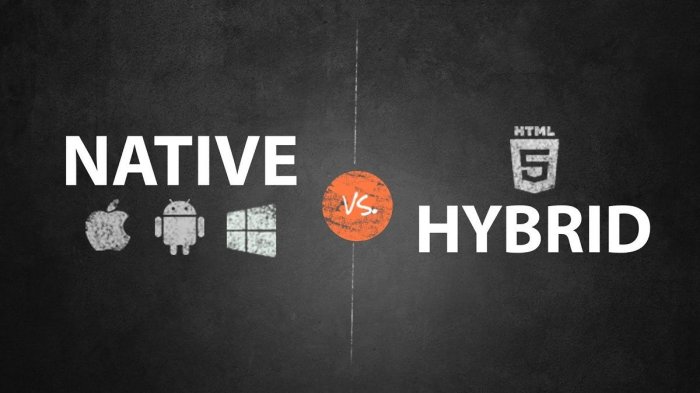
Non-native vs Native Apps

Non-native vs Native Apps

A native app is a mobile app designed particularly for a smartphone operating system such as Java for Android and Swift or Objective-C for iOS. Since native apps are designed within a mature environment following the user experience and technical guidelines for the operating system, it not only boasts of its higher performance but also seems perfect for the end user. The targeted audience is thus more likely to understand the navigation and features of the app quicker.

They also have the important benefit of being able to conveniently access and employ the inbuilt capabilities of a device such as a camera, contact list, GPS and so much more. These applications are usually faster than non-native apps, however, a different version needs to be designed for a different operating system which certainly adds to the development cost.

These days, an increasing number of mobile apps are being developed as cross-platform apps in HTML5, depending on the same tools that you use for developing sites. Non-native apps are also known as Hybrid apps which are developed using HTML5, JavaScript, and CSS rolled in a native container which loads the content on the page as the users navigated through the app. These apps surely appear like native apps but eventually outside the basic frame of App, these apps are fueled by the official site.

Ways to create mobile app with WordPress

App Builders

App Builders

App Builders are one of the easiest and cost-effective ways to build an app for your business. There are a plethora of app builders available which allow you to create a simple yet functional app without having any technical expertise and coding knowledge. Some of the most popular app builders include Telerik AppBuilder, Reactor, Good Barber, Shoutem, and Mobile Roadie. Each of these app builders offers a great WordPress support and allows you to incorporate comments and posts.

As an instance, Reactor is a great App Builder launched by AppPresser, which is particularly designed to help WordPress webmasters to create a mobile app that directly connects with their WP website. The app builder allows you to integrate WordPress custom content such as events and more, videos, photos, pages and posts. Moreover, unlike other app builders, it also has deep incorporation with things such as various plugins like WooCommerce integration and custom post types.

Well, app builders come with myriad pros and cons that should be considered before even considering this option to build your mobile app.

Benefits

App builder allows you to create an app without having to be familiar with any programming language or coding.
It also saves a lot of money and serves as a great option for those who do not have a huge budget for their mobile apps.

Limitations

App Builders allow you to build only a simple, functional app. However if you want to tweak the design or functionality of your app, you perhaps have to find another way of building an app.

Get a hybrid custom app

Getting a custom or tailor-made mobile app is another way of creating an app. This method works wonder for those who have unique or specific needs. Though this method requires a good budget and investment, it is worth all your investment, and efforts.
Getting a mobile app developed requires a framework and the WP-API technologies. A conventional hybrid mobile app primarily developed using JavaScript, CSS, and HTML. It is then combined with Apache Cordova (earlier known as PhoneGap) to provide access to native device features. The applications developed access WP content with the help of an API.

Creating your App’s API

wp-api

API is an application protocol interface, a tool which apps and websites use to interact with each other. If you are planning to integrate your app with another service, it would communicate with that through service’s API. Though it is not necessary to have your own API, it only makes it a lot convenient.
The main reason why you need an API for your app is to allow other services to incorporate with it. There would hardly be any better way to make your app an imperative part of your audience’s workflow than to integrate it into what your audience is already doing. In a nutshell, when you build something that integrates with the popular products, you get a chance to tap into their acclaimed user base.

How to create your own API?

Today, creating your own API is easy. There are basically two ways to create your own API โ€“ JetPack’s JSON API and WP-API.
Both the above are JSON RESTful APIs, which makes it extremely easy to work and incorporate with other application protocol interfaces that employ the same standard.

WordPress core comes with a new feature namely WP-API which is a WordPress’s JSON REST API, which provides a more decentralized approach. This new feature enables two-way communication like approving comments and creating posts from the mobile app. This feature also makes it easier to get the content of your WordPress website into mobile app. All you need to do is install a plugin called WP-API Plugin on your WP Powered site.


JetPack’s JSON API enables you to establish a tailor-made app that uses WordPress.com’s REST API and oAuth2 service. This API has been around for quite some time and has reached version 1.0 lately. The two API are almost similar in regards to functionality. However, the only difference between these two APIs is that WP-API hosted on your servers while JetPack’s API runs on WordPress.com’s servers.

Conclusion:

WordPress has become an integral part of the online world and with the passage of each day, the popularity of WordPress is only growing. There was a time when WordPress was used to build only blogs, however, today, WordPress is capable of powering mobile applications. In spite of this being a small scale application, the possibilities with custom fields, custom taxonomies, custom post types and typically anything related to CMS are endless.

I hope this article works as building blocks for your future mobile apps and help you create beautiful and fully functional apps.