February 9, 2023

The Future of Mobile App Development: What to Expect in 2023

Read More

The future of mobile app development is expected to rule by advancements in technology such as artificial intelligence, machine learning, and 5G networks. These technologies will enable mobile apps to become more personalized, efficient, and user-friendly. In 2023, we can expect an increased demand for cross-platform Mobile App Development and the integration of augmented reality and virtual reality into mobile apps. The reason is proven.

Stats says more than 6.3 billion people use smartphones globally. Furthermore, the number of users will keep increasing and would reach 7.6 billion by the year 2027.

The use of blockchain technology will also become more prevalent, providing increased security and transparency in mobile transactions. Overall, the future of building mobile apps is exciting and full of possibilities, and we can expect continued innovation and progress in the coming year.

The Emerging Technologies for Innovative Mobile App Development in 2023

Increased Focus on Cross-Platform Development

With the rise of 5G technology, cross-platform development would become more popular in the near future. This means that app developers will increasingly focus on creating apps that run seamlessly on multiple platforms, such as iOS and Android. The goal of cross-platform development is to provide users with a consistent experience across different devices and platforms.

Artificial Intelligence and Machine Learning

AI and ML technologies can become more integrated into mobile apps, allowing for more personalized and intuitive experiences. For example, AI algorithms can analyze user behavior patterns to make app recommendations and show personalized content. This will help to increase user engagement and improve the overall user experience.

Rise of Progressive Web Apps

Progressive web apps would be ruling in the near future, offering a more seamless experience between desktop and mobile devices. Progressive web apps are web-based applications that are designed to feel like native mobile apps. They are easily accessible through a web browser and provide users with a fast, responsive, and reliable experience, regardless of their device or platform.

Chatbots and Virtual Assistants

Chatbots and virtual assistants are expected to become more prevalent in mobile apps. Thus, providing users with instant access to information and services. These technologies use natural language processing to understand and respond to user queries, making them more accessible and user-friendly. They can ideal for a variety of purposes, such as customer support, booking appointments, or ordering food.

Internet of Things (IoT) Integration

The integration of IoT devices and technologies will become more common in mobile app development. Therefore, providing users with new and innovative ways to interact with the world around them. For example, mobile apps could be developed to control smart home devices, such as lighting, temperature, and security systems.

Blockchain Technology

Blockchain technology will be playing a greater role in mobile app development, offering new opportunities for secure data storage and transactions. It is a decentralized ledger that enables secure, transparent, and tamper-proof transactions. This makes it ideal for use in a variety of applications, such as financial services, supply chain management, and online voting.

Augmented Reality (AR) and Virtual Reality (VR)

AR and VR technologies will continue to play a significant role in mobile app development, providing users with more immersive and interactive experiences. For example, AR would be helpful in enhancing navigation, gaming, and education. On the other hand, VR would be ideal for training, simulation, and entertainment. These technologies will become more accessible and user-friendly, making them increasingly popular in the coming years.

Beacon Technology

Beacon technology is a valuable tool for mobile application development. It allows for location-based interactions between mobile devices and physical locations. By using BLE (Bluetooth Low Energy) signals, beacons can communicate with nearby mobile devices and trigger actions. For example, sending push notifications, providing location-based information, or displaying augmented reality content. This opens up new opportunities for businesses to engage with customers in real time. Also, it allows for providing a more personalized and interactive experience. Undoubtedly, the use of beacons is becoming more widespread. It means the mobile app developers will have to consider their integration into their designs and understand how they can enhance the user experience.

Extended Reality

Extended Reality (XR) is a fast-growing trend in mobile app development that combines the physical and digital worlds. XR technologies, including Augmented Reality (AR), Virtual Reality (VR), and Mixed Reality (MR), provide a more immersive and interactive experience for users. With the increasing popularity of smartphones, XR will revolutionize the way we interact with digital content. Also, it will play a crucial role in shaping the future of mobile app development. From gaming and entertainment to education and healthcare, XR has a vast range of applications and has the potential to transform many industries.

Conclusion

The future of mobile app development would be marked by increasing advancements in technology, particularly in areas such as artificial intelligence, augmented reality, and 5G connectivity. The trend toward multi-platform development and the use of low-code platforms will continue to make it easier for businesses to create and launch apps. Additionally, privacy and security concerns will become increasingly important. Thus, leading to a greater emphasis on data protection and secure app development practices. The rise of wearable technology and the Internet of Things will also provide new opportunities for app development in the coming years. Overall, the mobile app development industry will continue to grow and evolve. Thereby, providing new and innovative solutions for users. Stellen Infotech is a well-renowned website and mobile app development company delivering the best solutions to its clients. Our expert app developers follow the defined approach and effective practices to surpass the client’s expectations.

February 7, 2023

How to Integrate AI and Machine Learning into Web Applications

Read More

AI is changing what web applications can do.

A web application can now answer questions, understand documents, recommend products, personalize content, search large knowledge bases, and automate parts of a business process.

But adding AI is not as simple as connecting a model to a website.

The best results come from starting with a clear problem, choosing the right AI approach, using reliable data, and building the AI feature into the wider application architecture.

So, how do you integrate AI and machine learning into a web application?

You usually start by defining the use case, choosing the right model or service, connecting it to your application and data, testing the results, and then monitoring how it performs after launch.

This guide explains the main ways businesses can use AI and machine learning in web applications and what to consider before adding them.

What Is AI Integration in Web Application Development?

AI integration means adding artificial intelligence or machine learning capabilities to a web application so it can perform tasks that normally require human analysis, prediction, or decision-making.

These tasks can include:

  • Answering customer questions
  • Searching documents using natural language
  • Recommending products or content
  • Predicting customer behavior
  • Analyzing documents or images
  • Personalizing user experiences
  • Summarizing information
  • Qualifying leads
  • Automating business workflows

AI is not a replacement for the whole application. In most projects, it becomes one part of the existing system and works with the frontend, backend, databases, APIs, and business rules.

That means a successful AI project needs more than a good model. It also needs a sensible application architecture.

How Can AI Improve a Web Application?

AI can improve a web application when it solves a real user or business problem.

For example, it can help a customer find the right product without browsing through hundreds of pages. It can help an employee find information in a large document library. It can also help a support team handle common questions before a human agent gets involved.

Some of the most useful applications include:

  • Smarter search
  • AI assistants
  • Recommendations
  • Personalization
  • Document processing
  • Predictive analytics
  • Lead qualification
  • Workflow automation
  • Content summarization
  • Customer support

The important point is to start with the problem rather than the technology.

Do not ask:

“Where can we add AI?”

Ask:

“Which part of this process is slow, difficult, repetitive, or hard for users?”

That question usually leads to a better AI use case.

AI vs Machine Learning: What’s the Difference?

AI is the broader term for systems that perform tasks that normally require human-like reasoning or decision-making.

Machine learning is one way to build AI systems. It uses data to identify patterns and make predictions or decisions.

Modern web applications may use several types of AI:

  • Traditional machine learning
  • Generative AI
  • Large language models
  • Recommendation systems
  • Computer vision
  • Speech technologies
  • AI agents

The right approach depends on the problem.

A recommendation engine may use machine learning, while a customer support assistant may use a large language model connected to a company knowledge base.

Common AI Use Cases in Web Applications

1. AI Assistants and Customer Support

AI assistants are one of the most visible uses of AI in web applications.

A modern assistant can do more than return a fixed response. It can understand questions in natural language, search a knowledge source, use application data, and pass complex cases to a human.

For example, a customer portal could let users ask:

“Where is my order?”

The assistant could check order data through an API and return the latest status.

A support assistant could also answer questions about:

  • Products
  • Pricing
  • Policies
  • Documentation
  • Account information
  • Delivery
  • Troubleshooting

The key is to give the assistant access only to the information and actions it actually needs.

2. Intelligent Search and RAG

Traditional website search often depends on exact keywords.

AI-powered search can understand the meaning behind a query.

For example, instead of searching for:

“refund policy”

a user could ask:

“Can I get a refund if my subscription was cancelled last week?”

The system can search relevant content and return a more useful answer.

One common approach is retrieval-augmented generation (RAG).

RAG combines retrieval with generation. The system first finds relevant information from a knowledge source and then uses that information to create the response.

A simple flow looks like this:

User question โ†’ Search knowledge source โ†’ Retrieve relevant information โ†’ Generate answer

RAG can be useful for:

  • Product documentation
  • Internal company knowledge
  • Customer support
  • Policies
  • Technical documentation
  • Large document collections
  • Product catalogs

Google also describes retrieval-augmented generation, or grounding, as a way AI systems can use retrieved information to improve the quality, accuracy, and freshness of responses.

3. Personalization and Recommendations

Machine learning can help web applications understand patterns in user behavior.

For example, an e-commerce site could recommend:

  • Products a customer may like
  • Related products
  • Relevant offers
  • Content based on previous activity

A media platform could recommend articles, videos, or other content based on past behavior.

The system may use information such as:

  • Pages viewed
  • Search activity
  • Purchase history
  • Product interactions
  • Content preferences

However, personalization should be handled carefully. Businesses need to consider privacy, consent, data quality, and how much information they really need.

4. Document and Data Processing

Many businesses still spend time reviewing documents manually.

AI can help extract and organize information from:

  • Invoices
  • Applications
  • Contracts
  • Forms
  • Reports
  • Emails
  • Support tickets
  • Scanned documents

For example, a business application could read an invoice, identify the supplier, invoice number, date, and amount, and send the extracted information into an internal system.

This does not remove the need for human review in every case. Important or sensitive decisions may still require approval.

5. Predictive Analytics

Machine learning can be useful when a business has enough quality data to identify patterns and make predictions.

Possible use cases include:

  • Demand forecasting
  • Churn prediction
  • Fraud detection
  • Risk scoring
  • Sales forecasting
  • Inventory planning
  • Lead scoring

The quality of the result depends heavily on the data.

If the data is incomplete, biased, outdated, or poorly labeled, the model may produce unreliable results.

That is why data preparation should be part of the project from the start.

6. Lead Qualification and Workflow Automation

AI can also help businesses handle large numbers of enquiries.

For example, a web application could read an incoming enquiry and identify:

  • What service the person is asking about
  • How urgent the request is
  • Which industry they are in
  • Whether the request meets basic requirements

The system could then route the enquiry to the right team.

AI can also support workflows by calling APIs, updating records, or triggering other actions.

This is where AI moves beyond generating text and starts becoming part of the wider business process.

7. Generative AI for Content and Assistance

Generative AI can create or transform content based on a user’s request.

Within a web application, it can be used for:

  • Summarizing documents
  • Drafting emails
  • Creating product descriptions
  • Rewriting text
  • Generating reports
  • Answering questions about stored information
  • Helping users complete forms or tasks

The best use cases are usually those where AI helps a person work faster rather than simply creating more content.

For customer-facing applications, responses should still be checked for accuracy, relevance, and safety.

Traditional Machine Learning vs Generative AI

Not every AI problem needs a large language model.

The choice depends on what you want the system to do.

Use Case Traditional Machine Learning Generative AI
Product recommendations Strong fit Possible
Prediction Strong fit Usually not the first choice
Classification Strong fit Possible
Fraud detection Strong fit Supporting role
Text generation Limited Strong fit
Summarization Limited Strong fit
Conversational assistant Limited Strong fit
Document Q&A Possible Strong fit with RAG
Demand forecasting Strong fit Usually not the first choice
Workflow assistance Possible Strong fit when connected to tools

The best system may also combine both approaches.

For example, a web application could use machine learning to calculate a risk score and generative AI to explain the result in simple language.

AI Agents and Workflow Automation

AI agents are becoming a more important part of application development.

A simple AI assistant may answer a question.

An agent can potentially go further by:

  • Understanding a request
  • Choosing a tool
  • Retrieving information
  • Calling an API
  • Performing an action
  • Checking the result
  • Continuing to the next step

For example:

User request โ†’ AI interprets the request โ†’ Retrieves data โ†’ Calls an API โ†’ Completes the task โ†’ Reports the result

This can be useful for tasks such as:

  • Updating CRM records
  • Preparing reports
  • Checking order information
  • Scheduling tasks
  • Processing support requests
  • Running internal workflows

However, agent-based systems need stronger controls than simple chat interfaces.

They may have access to tools, data, and business systems. That means permissions, logging, testing, approval steps, and failure handling need to be designed from the beginning.

Current production guidance for AI agents puts strong emphasis on security, testing, observability, governance, and reliable execution rather than treating agents like simple chatbots.

How AI Fits Into a Web Application

AI usually sits inside a larger technical system.

A simple architecture might look like this:

User โ†’ Web Application โ†’ Backend/API โ†’ AI Layer โ†’ Model or AI Service

The AI layer may also connect to:

  • Databases
  • Knowledge bases
  • Vector search
  • Business APIs
  • Authentication systems
  • Internal tools
  • External services

For a RAG-based application, the flow could be:

User question โ†’ Authentication โ†’ Search knowledge base โ†’ Retrieve relevant data โ†’ AI model โ†’ Response โ†’ Web application

For an AI agent, the flow may include additional steps:

User request โ†’ AI model โ†’ Tool/API call โ†’ Business system โ†’ Result โ†’ AI model โ†’ User

This is why AI integration is often a software architecture project rather than a simple plugin.

How to Integrate AI Into a Web Application

1. Start With the Business Problem

Do not start by choosing an AI model.

First define the problem.

Ask:

  • What is slow?
  • What is repetitive?
  • Where do users struggle?
  • What takes too much manual work?
  • What decisions depend on large amounts of data?
  • What information is difficult to find?

A clear problem makes it easier to judge whether AI is actually useful.

2. Identify the Data You Need

Next, look at the information the AI system will use.

This could include:

  • Product data
  • Customer records
  • Documents
  • Support conversations
  • Knowledge bases
  • Historical transactions
  • User behavior

Check whether the data is accurate, complete, current, and legally safe to use.

3. Choose the Right AI Approach

Possible options include:

  • Existing AI API
  • Large language model
  • RAG
  • Traditional machine learning
  • Fine-tuned model
  • On-device AI
  • AI agent
  • Rules-based automation

You do not need the most advanced option.

Choose the simplest approach that solves the problem well.

4. Design the Application Architecture

Decide how the AI system will connect with the rest of the application.

This may include:

  • Frontend
  • Backend
  • APIs
  • Databases
  • Knowledge sources
  • Authentication
  • User permissions
  • Logging
  • Monitoring

Think about the complete system instead of treating the AI model as a separate feature.

5. Build and Test

Test more than whether the model produces an answer.

You should also test:

  • Accuracy
  • Relevance
  • Response time
  • Failure cases
  • Security
  • Cost
  • User experience
  • Different types of user input

AI systems can produce different outputs for similar requests, so testing needs to reflect real user behavior.

6. Launch With a Controlled Use Case

A smaller first release is often easier to test and improve.

For example, instead of building a fully autonomous support agent, start with an assistant that answers common questions and sends difficult cases to a human team.

This gives the business a chance to learn before expanding the system.

7. Monitor and Improve

AI systems need ongoing monitoring.

Track things such as:

  • Accuracy
  • User satisfaction
  • Response time
  • Error rate
  • Failed tasks
  • Cost per request
  • Escalations to humans
  • Business results

For AI agents, you may also need to measure whether tasks are completed correctly and safely.

Recent guidance on production AI agents increasingly focuses on operational reliability, workflow adoption, and measurable business impact rather than model output alone.

Security and Privacy Considerations

AI brings new security risks to web applications.

A system may process private customer information, internal documents, business data, or sensitive user input.

Some important areas to consider include:

Prompt injection

An attacker may use carefully designed input to influence an AI system in unintended ways.

Sensitive information disclosure

AI systems must not expose information a user is not authorized to access.

Improper output handling

AI output should not be trusted automatically when it is passed into another system.

Excessive agency

An AI agent should not have more permissions than it needs.

For example, a support assistant may only need read access to order data. It may not need permission to cancel orders.

Data and model risks

Training data, embeddings, external models, and third-party AI services can introduce additional security concerns.

OWASP’s 2025 Top 10 for LLM applications includes risks such as prompt injection, sensitive information disclosure, supply-chain problems, improper output handling, excessive agency, vector and embedding weaknesses, misinformation, and unbounded consumption.

Security should therefore be part of the architecture from the beginning, not something added after the AI feature is finished.

Testing and Monitoring AI Features

Traditional software testing is still important, but AI features need additional checks.

A useful AI testing process can include:

  • Functional testing
  • Security testing
  • Accuracy testing
  • Prompt testing
  • Retrieval testing
  • Performance testing
  • User acceptance testing
  • Bias and safety checks
  • Regression testing

For RAG systems, test whether the system retrieves the right information before judging the final answer.

For AI agents, test whether the correct tool is selected, whether permissions are respected, and what happens when a tool fails.

The goal is not only to make the AI answer well. It is to make the entire feature work reliably inside the application.

When Should You Avoid Adding AI?

AI is not the best answer to every problem.

A simple rule-based system may be better when:

  • The process follows fixed rules
  • The task is predictable
  • The data is limited
  • Results must be completely deterministic
  • AI would add unnecessary cost
  • A standard search or filter already solves the problem

For example, if a user simply needs to filter products by price, size, and category, traditional filtering may be better than adding an AI model.

The right question is not:

“Can we use AI here?”

It is:

“Will AI make this process better for the user or the business?”

How Much Does AI Integration Cost?

There is no single cost for adding AI to a web application.

The final effort depends on:

  • The type of AI feature
  • Data preparation
  • Model or API costs
  • Application architecture
  • Integrations
  • Security requirements
  • User volume
  • Testing
  • Monitoring
  • Ongoing maintenance

A simple AI assistant using an existing API can be very different from a custom RAG platform connected to private business data and multiple internal systems.

The right first step is to define the use case and technical requirements before estimating the project.

How to Choose the Right AI Technology

Use the business requirement to guide the technology choice.

Requirement Possible Approach
Customer questions AI assistant / LLM
Company knowledge search RAG
Product recommendations Machine learning / recommendation system
Document extraction AI document processing
Forecasting Machine learning
Content summarization Generative AI
Lead qualification LLM + business rules
Workflow automation AI + APIs
Multi-step task execution AI agent
Sensitive or offline processing On-device or controlled private deployment

There is no need to use the most advanced AI technology for every project.

A simpler solution is often easier to test, secure, maintain, and control.

AI Integration Is Part of Web Application Development

AI works best when it is treated as part of the application rather than as a separate add-on.

A well-designed solution connects the AI layer with the rest of the system:

User experience โ†’ Application logic โ†’ AI โ†’ Data โ†’ APIs โ†’ Business workflows

This makes it possible to build useful features without losing control over security, permissions, data, and system behavior.

For businesses exploring web application development, AI can be added to new or existing applications based on a specific business use case.

Frequently Asked Questions

What is AI integration in web application development?

AI integration means adding artificial intelligence or machine learning capabilities to a web application. Common examples include AI assistants, smart search, recommendations, predictive features, document analysis, personalization, and workflow automation.

How can AI improve a web application?

AI can help users find information faster, automate repetitive work, personalize experiences, analyze data, support customer service, and assist with business workflows.

What is RAG in web application development?

RAG, or retrieval-augmented generation, combines information retrieval with an AI model. The system first retrieves relevant information from a knowledge source and then uses that information to generate a response.

Are AI agents the same as chatbots?

No. A chatbot mainly communicates with users. An AI agent can potentially use tools, retrieve information, call APIs, and complete tasks. Because agents can take actions, they require additional controls and testing.

Should every web application use AI?

No. AI is useful when it solves a real problem. For simple and predictable tasks, traditional software or rules-based automation may be a better option.

Is machine learning different from generative AI?

Yes. Machine learning is a broad approach used for tasks such as prediction, classification, and recommendations. Generative AI is designed to create or transform content such as text, images, or other outputs.

How do I add AI to an existing web application?

Start by defining the use case, reviewing available data, selecting the AI approach, designing the integration architecture, building and testing the feature, and then monitoring it after launch.

How do I keep AI features secure?

Use strong authentication and permissions, control access to data and tools, validate AI outputs, protect sensitive information, monitor activity, and test for risks such as prompt injection and excessive agency. OWASP’s current LLM guidance provides a useful security framework for these risks.

Build an AI-Enabled Web Application

AI can add useful capabilities to a web application, but the technology should always support a clear business or user need.

Start with the problem. Then choose the simplest AI approach that can solve it well.

That might mean a recommendation model, a RAG-powered knowledge assistant, an AI document workflow, or an agent that can work with business APIs.

The strongest AI applications are not simply the ones with the most features. They are the ones that solve a real problem, use reliable data, fit into the existing application, and can be tested, secured, and improved over time.

Stellen Infotech provides web application development and custom application solutions for businesses building or modernizing web-based platforms. AI capabilities can be considered as part of the wider application architecture when they provide a clear benefit to users or business operations.

February 2, 2023

Native vs Cross-Platform App Development: Which Is Right for Your Business?

Read More

Choosing how to build a mobile app is one of the first major decisions a business needs to make. The two approaches most businesses compare are native and cross-platform development.

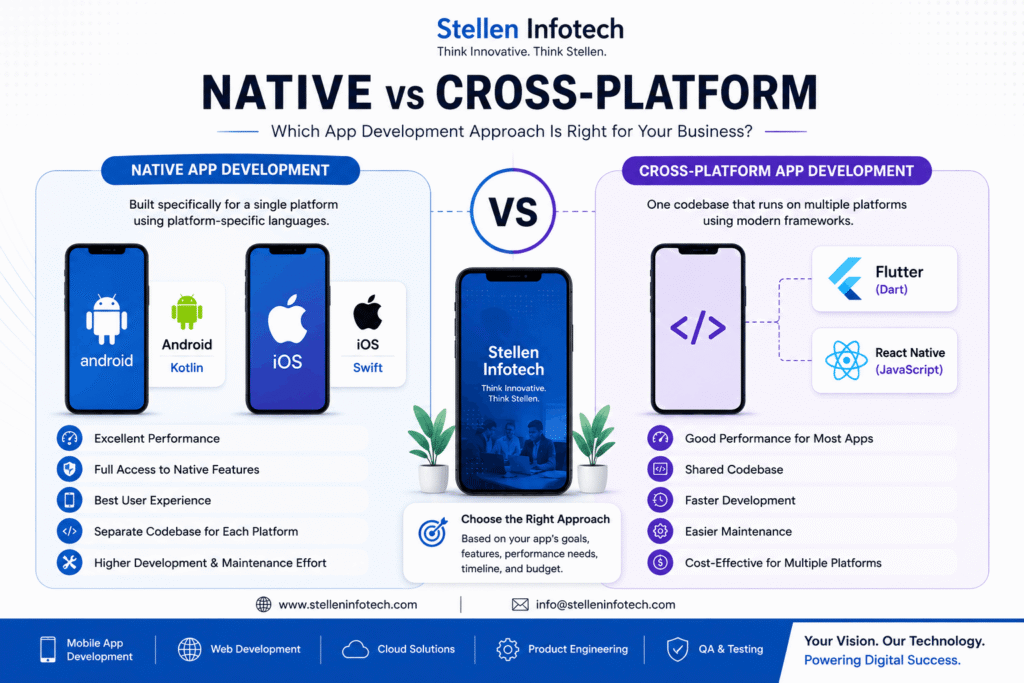
Native apps are built specifically for Android or iOS, while cross-platform apps use a shared codebase to target multiple platforms. Native development offers deeper platform-specific control, while cross-platform development can reduce duplicated development work and help businesses launch on multiple platforms more efficiently.

Neither approach is automatically better. The right choice depends on the app’s features, performance requirements, budget, timeline, target platforms, and long-term maintenance needs.

This guide explains the key differences between native and cross-platform app development and when each approach makes sense.

Native vs Cross-Platform App Development: Quick Comparison

App Development
Factor Native App Development Cross-Platform App Development
Platforms Built separately for Android or iOS One shared codebase can target multiple platforms
Android technology Kotlin Flutter, React Native and others
iOS technology Swift Flutter, React Native and others
Performance Excellent platform-specific performance Very good for most business applications
Code reuse Limited between platforms High
Platform-specific features Excellent access Good, with native modules when required
Development effort Higher when building for multiple platforms Often lower for multi-platform apps
Maintenance Separate platform codebases More shared code
Best suited for Performance-heavy or platform-specific apps Many business and consumer apps targeting multiple platforms

What Is Native App Development?

Native app development means building an application specifically for a particular operating system.

For Android, developers commonly use Kotlin, while iOS applications are typically developed using Swift. Because the application is designed for a specific platform, developers can work closely with the operating system and its native APIs.

This approach is particularly useful when an application needs advanced device capabilities, highly customized platform-specific interfaces, or intensive processing.

Businesses looking to use a hybrid app development approach do not need to write unique codes for each platform. The biggest upside is that it requires a single codebase and can work across multiple platforms. Mobile application developers from the best app development agency can create a single and unique codebase to be best deployed across all platforms. As a result, it saves time for developers working on various projects specifically designed for every platform making it worth consideration.

Advantages of Native App Development

Better platform-specific performance

Native applications are designed for the operating system they run on, giving developers direct control over platform-specific functionality and performance.

Access to native device features

Native development is a strong choice when an app relies heavily on features such as advanced camera capabilities, Bluetooth, sensors, location services, or other platform APIs.

Platform-specific user experience

Native applications can follow the design patterns and interaction conventions of Android or iOS more closely.

Strong option for complex applications

Apps involving intensive graphics, advanced hardware integration, or demanding real-time functionality may benefit from native development.

Limitations of Native App Development

The main drawback is that developing for multiple platforms generally means maintaining separate platform-specific codebases.

For example, a business launching on both Android and iOS may need separate development work for each platform. This can increase development and maintenance effort.

That does not mean native development is always more expensive. The actual cost depends on the complexity of the application, the number of platforms, required integrations, and the development team.

What Is Cross-Platform App Development?

Cross-platform app development allows developers to build applications for multiple platforms using a largely shared codebase.

Popular frameworks include Flutter and React Native.

Instead of maintaining completely separate applications from the beginning, businesses can share a significant portion of the development work between Android and iOS.

This makes cross-platform development particularly attractive for businesses that want to reach multiple platforms while keeping development more streamlined.

Advantages of Cross-Platform Development

Shared codebase

A large portion of the application can be developed using shared code, reducing duplicated work between platforms.

Faster development for many projects

When the same functionality is required on Android and iOS, sharing code can help reduce development time.

Simpler maintenance

Changes to shared functionality can often be handled from the shared codebase rather than being implemented independently in two applications.

Good fit for many business applications

E-commerce apps, customer portals, booking applications, internal business apps, content platforms, and many other applications can work well with a cross-platform approach.

Limitations of Cross-Platform Development

Cross-platform development is not suitable for every application.

Some applications require extensive platform-specific functionality. In those situations, developers may need to write native code or use native modules alongside the cross-platform framework.

The level of performance and platform integration also depends on the framework, application architecture, implementation quality, and the features being used.

So the decision should be based on the actual requirements of the application rather than assuming that cross-platform is always the cheaper or faster option.

Flutter vs React Native

Flutter and React Native are two of the most widely used approaches for cross-platform mobile development.

Flutter

Flutter is Google’s UI toolkit that uses the Dart programming language. It allows developers to build applications for multiple platforms from a shared codebase.

Flutter can be a good choice when a project requires:

  • Highly customized interfaces
  • Consistent UI across platforms
  • Rapid development
  • Shared application logic
  • Cross-platform deployment

React Native

React Native is a framework developed by Meta that allows developers to build mobile applications using JavaScript or TypeScript and React.

It can be particularly suitable for teams that already have experience with React and the JavaScript ecosystem.

React Native also allows developers to integrate native code when platform-specific functionality is required.

Which one is better?

There is no universal winner between Flutter and React Native.

The right choice depends on the existing technical team, application requirements, UI needs, integrations, platform-specific functionality, and long-term maintenance plans.

Native vs Cross-Platform: Which Has Better Performance?

Native applications generally provide the greatest level of platform-specific performance because they are built directly for the operating system.

However, that does not mean cross-platform applications are slow.

Modern cross-platform frameworks can provide strong performance for many business and consumer applications. For a typical e-commerce, booking, social, content, or enterprise application, performance may not be the deciding factor.

The difference becomes more important when an application relies heavily on:

  • Advanced graphics
  • Real-time processing
  • Complex animations
  • AR or specialized device capabilities
  • Intensive background processing
  • Highly customized native functionality

In these cases, native development may offer more control.

Native vs Cross-Platform: Which Is More Cost-Effective?

Cross-platform development can reduce duplicated development work when an application needs to run on both Android and iOS.

However, it is not accurate to say that cross-platform development is always cheaper.

The final cost depends on factors such as:

  • Application complexity
  • Number of platforms
  • Design requirements
  • Backend integrations
  • Third-party APIs
  • Device features
  • Testing requirements
  • Security requirements
  • Maintenance needs

For a relatively standard business application targeting Android and iOS, cross-platform development may provide an efficient way to share development effort.

For an application that requires extensive platform-specific functionality, native development may be the more practical long-term choice.

When Should You Choose Native App Development?

Native development is often the better option when:

  • Performance is a critical requirement
  • The app relies heavily on platform-specific features
  • You need extensive access to device hardware
  • The application requires highly customized native functionality
  • You are building a graphics-intensive or specialized application
  • Android and iOS experiences need to be designed independently

For example, an application that depends heavily on advanced camera capabilities, specialized sensors, AR features, or other platform-specific technologies may benefit from native development.

When Should You Choose Cross-Platform App Development?

Cross-platform development can be a strong option when:

  • You need both Android and iOS applications
  • A large portion of the functionality can be shared
  • Time to market is important
  • You want to reduce duplicated development work
  • The application uses standard mobile features
  • You want a more unified development and maintenance process

For many business applications, the ability to share code across platforms makes cross-platform development an attractive option.

What About App Maintenance?

Choosing a development approach also affects what happens after the application launches.

Mobile applications need ongoing maintenance for:

  • Operating system updates
  • Security fixes
  • Bug fixes
  • Dependency updates
  • API changes
  • Performance improvements
  • New features
  • Compatibility with newer devices

With native development, teams generally maintain separate platform-specific codebases.

With cross-platform development, more of the application can be maintained through shared code, although platform-specific updates and native modules may still require separate work.

This is why businesses should consider long-term maintenance before choosing a development approach.

Native vs Cross-Platform: Which Is Right for Your Business?

There is no single answer that works for every mobile application.

Choose native development when performance, deep platform integration, or specialized device functionality is central to the product.

Choose cross-platform development when you need Android and iOS applications and a significant amount of functionality can be shared between platforms.

For a standard business application, cross-platform development can offer an efficient way to reach multiple platforms. For highly specialized applications, native development may provide greater control.

The best decision should be based on your application’s requirements rather than simply choosing the technology that is currently most popular.

Frequently Asked Questions

Is native better than cross-platform app development?

Not necessarily. Native development provides greater platform-specific control and can be preferable for performance-intensive or specialized applications. Cross-platform development can be a better fit when businesses want to build for multiple platforms while sharing much of the codebase.

Is cross-platform app development cheaper?

It can be more cost-effective when a significant amount of functionality can be shared between Android and iOS. However, the total cost depends on the application’s complexity, integrations, device features, testing, and maintenance requirements.

Is Flutter better than React Native?

Neither is universally better. Flutter and React Native have different technical ecosystems and strengths. The better choice depends on the application’s requirements, development team’s expertise, UI requirements, integrations, and long-term plans.

Do cross-platform apps perform as well as native apps?

Cross-platform frameworks can provide strong performance for many applications. Native development can have an advantage when an application requires intensive graphics, specialized hardware integration, or highly platform-specific functionality.

Which is better for Android and iOS development?

If the application needs both Android and iOS and much of the functionality can be shared, cross-platform development can be an efficient option. If each platform requires highly specialized functionality, separate native development may be more suitable.

Can cross-platform apps use native device features?

Yes. Cross-platform frameworks can access many device capabilities and can also integrate native code when a project requires platform-specific functionality.

How do I choose between native and cross-platform development?

Start with your application’s requirements. Consider the target platforms, performance needs, device features, budget, development timeline, existing technical expertise, and long-term maintenance requirements before selecting an approach.

Build the Right Mobile App Development Strategy

Choosing the right technology is only one part of building a successful mobile application. The development approach should support the product’s features, users, performance requirements, and long-term roadmap.

If you are planning an Android, iOS, or cross-platform application, Stellen Infotech’s mobile app development services can help you evaluate the right development approach and build an application around your business requirements.

February 1, 2023

Why Custom Web Development Is Vital For Your Business Growth

Read More

Having a unique and impeccable website is a must for every business. It enables the representation of brand offerings including products and services to a wide variety of audiences across the globe. A website optimized for conversions, search engine rankings, and user experience further leads to increased sales, traffic, and engagement. Additionally, hiring Custom Web Development Services helps by ensuring that a business’s website and online presence are optimized for mobile devices. Thus, leading to increased engagement and conversions from mobile users.

Now, read this blog post to understand the several reasons that make custom web development the best and preferred choice for your business.

5 Reasons To Choose Custom Website Development For Your Business:

1. Unique Website Design:

Every business is unique and different from one another, and so do its websites. Custom web development ensures a unique website design by creating a custom layout and visual design for the client, rather than using pre-made templates or themes. Tailor the design to the client’s specific branding and aesthetic preferences with this. Additionally, custom web development allows the integration of unique functionalities and features that may not be available in pre-made templates. This can include the use of custom graphics, layouts, and color schemes that align with the client’s brand identity. Additionally, enhance the website with customized functionality to provide a unique user experience and set the client apart from their competitors.. This can include features such as personalized forms, e-commerce functionality, and integration with other systems. Remember businesses with unique website design not only represents the brandโ€™s vision stronger but also marks a competitive advantage in the market.

2. Excellent Loading Speed And Security:

Build a custom website with better security features to protect sensitive data and prevent cyber attacks. It can assure excellent security by implementing best practices such as using secure protocols. These may include implementing user authentication and authorization and properly handling sensitive data (e.g. encryption). It can also assure excellent loading speed by optimizing code and using performance-enhancing technologies such as caching, content delivery networks, and minifying resources. Additionally, regular testing and monitoring can help ensure that the website continues to perform well over time.

3. Better User Experience:

Optimize the custom website for user experience, providing a more seamless and enjoyable experience for visitors. Achieve this by conducting user research and testing to understand the audience’s behavior, goals, and pain points, and then incorporating those insights into the design and development of the website. Use custom web development to create unique, intuitive interfaces and interactions. Thus, making it easy for users to find and access the information they need. Additionally, custom development allows for more flexibility and scalability, which can help adapt to the user’s changing needs over time.

4. Tailored to meet specific business needs:

A custom website is designed and developed to meet the unique requirements and goals of a business. It involves working closely with a client to understand their specific business needs and goals for their website. For example, it helps identify key features and functionalities that are required as well as any design elements that need to be incorporated. The developer then uses this information to create a custom website that is tailored to meet those specific needs. This process typically includes several rounds of feedback and revisions. Thus, ensuring that the final product is exactly what the client is looking for.

5. Better search engine optimization (SEO):

A business site optimized for search engines helps to increase visibility and drive more traffic to the site. It can be obtained by implementing best practices for on-page SEO such as proper use of headings, meta tags, and alt tags. Additionally, a custom website can be designed with a clear site structure that makes it easy for search engines to crawl and index the site’s pages. The tailored functionality can also be used to create unique and valuable content that can attract backlinks, which are an important factor in SEO.

Another way custom web development can assure better business SEO is by creating a site that is fast, responsive, and mobile-friendly, as search engines favor websites that are optimized for mobile devices.

Moreover, custom web development can also include the integration of analytics and other web development tools. All this provides valuable insights into how users interact with the site and help to identify areas for improvement in terms of SEO.

6. Better integration with other systems:

A tailor-made website can be integrated with other systems such as CRM and e-commerce platforms to streamline business processes and improve efficiency.

This allows for more seamless integration of the web application with the organization’s existing systems and infrastructure such as databases, APIs, and third-party tools. Additionally, custom development allows for the creation of unique functionality and features that may not be available with off-the-shelf solutions. Overall, custom web development provides greater flexibility and control, which leads to better integration and overall system performance.

Final Words:

Custom web development services allows businesses to have a unique and tailored online presence that meets their specific needs and goals. It allows for greater flexibility and scalability, as well as the ability to integrate with existing systems and platforms. In addition, tailor-made web development allows for the creation of unique and innovative features and functionality. Thus, giving businesses a competitive edge. Overall, custom web development is a worthwhile investment for businesses that want to stand out and achieve success online.

So, what to wait for? Invest in custom web development services offered by Stellen Infotech. We are a reputable and experienced web development company that can help you create a website that meets your specific needs and goals.

January 25, 2023

5 Ways to Enhance App Performance and Boost User Engagement

Read More

Building the best mobile application is not something that can be accomplished by following a single step. The final result is the outcome of following various Mobile Application Development steps properly and effectively. Today, mobile applications are the best and a great way of building an audience and converting into prospect leads. Google Play and Apple App Store feature millions of applications. The competition for the best mobile application development in the market is massive. Fully optimizing your mobile application is vital for great user engagement.

Mobile application performance majorly determines engagement with users. Poorly performing application fails at engaging and retaining users and often results in losing valuable prospect leads. Monitoring your mobile application constantly is essential for encouraging long-term application success. Also, cultivating result-oriented ways for improving application performance is a great way of increasing user engagement.

Letโ€™s take a deeper look at the best ways to be implemented for achieving desired results.

Mobile Application Performance Optimization: 5 Ways To Increase Userโ€™s Engagement:

1. Facilitate An Offline Mode:

Gone are those days when users find it difficult to access mobile applications due to issues in internet connectivity. With technological advancements, businesses are facilitating offline mode within mobile applications for user-friendliness in every network condition. Offline mode is a trending feature in the market of mobile application development encouraging user engagement in poor network areas and conditions.

Integrating offline mode within your mobile application will allow users to save their crucial data and return to the same once connected. It creates a buffer for usersโ€™ information storing it safely in case of loss in a network connection. Facilitating so will allow your prospective users to visit your app store in an offline mode. Additionally, the application will run seamlessly allowing users to facilitate access to your products and services. As a result, it will not only increase user engagement but, also the chances of users purchasing from your app store.

2. Use CDN For Accelerating APIs:

Today businesses are using a content delivery network (CDN) for accelerating their mobile application programming interface (API). We all have used weather forecast or traffic update applications for required information once in our entire lives. An API performs heavy lifting behind the scenes. This interface is a building block responsible for effectively communicating and properly displaying content information from third-party source applications.

A Content delivery system positively speeds up API’s process in retrieving information delivered through native applications. Using CDN in your applications will use servers all around the globe to accelerate information close to your user location. This edge server mitigates the user’s location in a geographical sense, round-trip time, payload, size, and latency. It reduces the distance of information to the user. As a result, this significantly boosts mobile applications’ programming interface speed providing users with relevant information quickly and positively impacting users’ engagement.

3. Optimize Your Application Code:

We all are aware of the fact that not optimizing website aspects properly including visuals, and technical aspects affect loading speed. The same goes for code optimization. Optimizing your applicationโ€™s code is crucial to avoid your appโ€™s taking longer to respond on various devices. Not only it affects user engagement but, also impacts sales influencing the overall ROI of the business. Code optimization is best understood as the method of modifying code to improve quality and efficiency.

Unoptimized code is one of the major concerns for slow performance and even potential crashes. Developers need to ensure that the code is clean, compressed concisely, and executes rapidly with the best coding practices during mobile application development. Ensure that the applicationโ€™s size is smaller and consumes less memory. This will allow more users to download applications retaining them for a long resulting in increasing user engagement.

4. Gamification To Increase User Engagement:

Making use of gamification for building engagement with users is a great option. Turning your application offerings including products and services into a gamified experience will drive users to engage more with your valuable deeds. The craze of todayโ€™s youth generation for games is clearly visible in our everyday lives. Getting forward for achieving rewards in games keeps poking usersโ€™ heads. Various businesses are using custom mobile application development services to get their application best customized according to their needs. Competition for driving users crazy with the aim of increasing user engagement is massive. The best way is to offer valuable rewards to your application users as they keep on getting ahead within your mobile application. Doing so, will not only build more engagement but, also encourage greater lead conversion rates.

5. Set An APM System:

Whatโ€™s best than setting up an application performance monitoring system for constantly monitoring your application’s overall performance? The role of APM is far beyond monitoring application crashes. This system is a combination of approaches including product reviews and ratings, monitoring crashes, and, most importantly, products or services health. It is one of the integral ways to provide a top-notch user experience by keeping your users happy and encouraging them to come back for more.

Setting up an APM system has become one of the crucial ways for increasing user engagement in todayโ€™s competitive world. Integrating this system within your mobile application will help to quickly understand your applicationโ€™s end usersโ€™ difficulties. As a result, this will help in providing your users with presenting your products and services in the best manner possible.Doing so will not only encourage better engagement with users but will also facilitate a lead conversion.

Conclusion:

In conclusion, improving app performance and increasing user engagement are crucial for the success of your business. The five strategies outlined in this blog, such as optimizing the app’s design, reducing loading times, and implementing push notifications, are proven methods for achieving these goals. At Stellen Infotech, we understand the importance of providing users with a seamless and enjoyable experience, and we are dedicated to helping our clients achieve this through our expertise in app development and optimization. We hope this blog has been informative and helpful for you in your quest to improve your app’s performance and user engagement.

January 19, 2023

Best PHP Frameworks to Choose for Web Application Development

Read More

When it comes to web application development, choosing the right framework can make a huge difference in terms of efficiency and ease of use. PHP is one of the most popular programming languages for web development and has a wide variety of frameworks to choose from. Some popular PHP website development frameworks include Laravel, CodeIgniter, and Yii. All these can help streamline the development process. Furthermore, these frameworks provide developers with a set of tools and libraries to help them build robust, scalable web applications quickly and easily.

In this write-up, we will discuss these best frameworks for the Web application development in detail , covering everything from features to benefits.

6 Top PHP Website Development Frameworks

Laravel

Laravel is a free, open-source PHP web framework popular for its elegant syntax and simple, yet powerful tools. It is built on top of the PHP language and provides a huge number of features, including routing, authentication, and caching. In addition, Laravel has a built-in command line interface (CLI) that allows developers to quickly create and manage web applications.

Some of the main features of Laravel include:

Laravel Homestead: It is a pre-packaged feature box providing a virtual website development space, eliminating the need to install any web server. Furthermore, Laravle in itself is a package of extensive features and functionalities. It allows easy configuration and customization of complex apps: easy encryption, data migration, authentication, and more.

Artisan Command-Line Interface: Laravel’s Artisan CLI provides developers with a set of helpful commands that are useful in generating boilerplate code, perform database migrations, and more.

Community Forum: Laravel is a great pick because of its vibrant community forum and tutorials. Because of this, learning to code in PHP and utilizing Laravel becomes simple for beginners.

CodeIgniter

CodeIgniter is a lightweight PHP framework popular for its ease of use and small footprint. It is ideal for small-scale web applications and has a simple syntax that makes it easy for new developers to begin with. Moreover, CodeIgniter has a built-in caching system, which can greatly improve the performance of web applications.

Some of the key features of CodeIgniter include:

Lightweight and Fast: CodeIgniter has a small footprint and requires minimal setup, making it a popular choice for developers who want to quickly begin with website development. It is also fast, as it uses a simple and efficient system for loading and executing code.

Model-View-Controller (MVC) Architecture: CodeIgniter follows the Model-View-Controller (MVC) architectural pattern. It separates the application’s data, presentation, and control logic. This helps to keep the code organized and maintainable.

Database Support: CodeIgniter provides built-in support for working with databases. Also, it includes support for a wide range of database management systems such as MySQL, PostgreSQL, and SQLite.

Form and Data Validation: CodeIgniter provides built-in support for form and data validation. Thus, making it easy to ensure that the data entered by users is valid and safe to use.

Security: CodeIgniter includes several built-in security capabilities, such as input validation and XSS filtering. It helps to protect your application from security threats.

CakePHP

CakePHP is an open-source web development framework written in PHP. It follows the Model-View-Controller (MVC) architectural pattern and is designed to make it easier to build, maintain, and scale web applications.

Some key features of CakePHP website development framework include:

Convention Over Configuration: CakePHP uses a set of conventions to automatically generate the structure and behavior of the application. Thus, reducing the amount of boilerplate code that needs to be written.

Built-in Validation: CakePHP includes a built-in validation library that helps to validate user input, reducing the need to write custom validation code.

Query Builder: CakePHP includes a query builder that can be used to generate complex database queries. Therefore, making it easier to interact with the database.

Template Engine: CakePHP includes a built-in template engine that allows you to separate the presentation of your application from the business logic.

Security:CakePHP website development framework includes several built-in security features, such as input validation, cross-site scripting (XSS) protection, and cross-site request forgery (CSRF) protection.

Symfony

Symfony is a powerful, full-featured PHP framework that is perfect for large-scale web applications. It is built on top of the PHP language and provides a wide range of tools and features, including caching, routing, and authentication. Symfony also has a large and active community, which means that developers can easily find support and resources when needed. Besides, it includes a wide range of features to help developers build robust, scalable web applications quickly and easily.

Some of these include:

Individual Modularity Settings: Symfony is made up of several standalone components that can be used independently or together as a full-stack framework. This allows developers to choose only the components they need and create a custom stack to fit their specific needs.

Dependency Injection: Symfony uses a Dependency Injection (DI) pattern, which makes it easy to manage dependencies and decouple different parts of the application.

Quick Templating With Twig: Symfony includes a built-in templating engine, Twig. It allows developers to create and organize templates simply and efficiently.

Debugging and Profiling: Symfony includes a built-in debugging and profiling tool, the Symfony Debug Toolbar. It allows developers to quickly identify and troubleshoot performance issues.

Yii

Yii is a high-performance PHP framework that is ideal for large-scale web applications. It is built on top of the PHP language and provides a wide range of features, including caching, routing, and authentication. Yii is also popular for its performance and scalability, making it a great choice for web applications that need to handle a large amount of traffic.

Some of the key features include:

In-Built Security: Yii includes built-in support for preventing common web application security vulnerabilities, such as cross-site scripting (XSS) and SQL injection attacks.

Model-View-Controller (MVC) Design Pattern: Yii follows the MVC pattern. It helps to separate the logic of an application into different components, making it easier to maintain and extend.

Caching: Yii includes caching support, which helps to improve the performance of an application by caching data in memory or on disk.

Zend Framework

Zend Framework is a powerful, full-featured PHP framework that is perfect for large-scale web applications. It is built on top of the PHP language and provides a wide range of tools and features, including caching, routing, and authentication. Furthermore, Zend Framework has a large and active community, which means that developers can easily find support and resources when needed.

Some of the key features include:

MVC: Zend Framework implements the Model-View-Controller (MVC) pattern. It helps to separate the logic of an application into different components, making it easier to maintain and extend.

Object-Oriented Design: Zend Framework follows object-oriented design principles and encourages developers to use best practices such as dependency injection, encapsulation, and polymorphism.

Security: Zend Framework includes built-in support for preventing common web application security vulnerabilities. For example, cross-site scripting (XSS) and SQL injection attacks.

RESTful Web Services: Zend Framework includes built-in support for creating RESTful web services. It enables the easy building of applications that other systems can easily use.

Extensible: Zend Framework provides a lot of features out of the box. However, it’s also highly extensible. You can replace or extend any component with your own implementation.

Conclusion

In conclusion, there are many PHP frameworks available to choose from, each with its own set of features and advantages. Laravel, CodeIgniter, Symfony, Yii, and Zend Framework are some of the best PHP frameworks for web application development and can make the development process a lot more efficient and enjoyable. The best choice depends on the specific needs of your project and your teamโ€™s experience. Consider your project requirements and choose the framework that best meets those needs.

Besides, you can hire PHP website developers at Stellen Infotech. Our expert developers have the skills and knowledge in place to build technically-rich websites. We believe in building versatile and robust websites with leading web development services that cater to your needs.

January 17, 2023

How Will AI Impact Search Engine Optimization In 2023

Read More

The impact of AI on SEO services is already being felt in the search results pages. AI-based search engine optimization techniques allow marketers to rank higher in the SERPs, which translates into better visibility for their brand. In recent years, the field of artificial intelligence (AI) has made significant progress, and its impact on various industries is becoming increasingly apparent.

Artificial Intelligence refers to machines that can perform tasks that humans can do. For example, speech recognition, content creation, image recognition, and natural language processing.

Search engines use AI for ranking websites based on how relevant their content is to queries. Artificial Intelligence is an evolving technology used in SEO that eases the categorization of data classification much quicker and more efficiently than before. Also, with Google regularly updating its algorithms to enhance user experience, SEO services are shifting to such advanced technologies to adapt and achieve desired results.

Undoubtedly, AI is a developing technology employed in SEO that can deliver the appropriate data-based insights to meet customer expectations.

Ways AI Will Affect Search Engine Optimization In 2023 And In The Coming Years:

Relevant And Best-Quality Content Are The New Ranking Factors

We all know the internet is already flooded with a wide range of data and information. But what customers and search engines look for is information quality and relevance. This is why Google has advanced its algorithms to process searches, determine data relevancy, and rank the exact results.

Artificial intelligence (AI) can help generate quality content by analyzing and understanding large amounts of data, recognizing patterns, and making predictions. AI-powered content generation tools will be helpful in creating written content, such as articles and blog posts, as well as video and audio content. These tools will further help to optimize and personalize content for specific audiences, and to improve the overall quality and relevance of the content.

AI can also help in identifying and eliminating duplicate content, low-quality content, and spammy links. Thus, improving the overall quality of the search results.

Artificial Intelligence Can Generate Accurate Content

Artificial Intelligence (AI) in content marketing can generate accurate content through several methods. One way is using Natural Language Processing (NLP) techniques to analyze and understand a lot of data and identify patterns and trends. This allows AI to generate content that is relevant and informative. Another method is using machine learning algorithms to train the AI model on a dataset of high-quality, accurate content. This allows the AI to learn the language and style of the content and generate similar content that is also accurate. Additionally, AI will assist in fact-checking and verifying the accuracy of the content generated by humans, by cross-referencing with multiple reliable sources. This can help reduce the risk of errors and inaccuracies in the content.

Increased Productivity With AI

Artificial intelligence (AI) can increase productivity and positively impact SEO in several ways:

  • AI-powered content generation tools can quickly and efficiently create high-quality, relevant, and unique content that is optimized for search engines. It can analyze a website’s content and suggest changes to improve its SEO. For example, the addition of keywords, internal linking, and meta tags.
  • AI can assist in finding and building high-quality backlinks to a website, which is an important factor for SEO. Also, it will help to personalize the content and website experience for different visitors. Therefore, improving the user experience and increasing engagement.

All these benefits will assure better visibility in search engine results, higher traffic, and ultimately an increase in productivity.

AI Will Influence Website’s Ranking Process

With the use of machine learning algorithms, search engines will be able to analyze and understand the content of a website more effectively. This will enable them to rank the website based on factors such as relevance, user engagement, and authority.

AI can also be used for analyzing user behavior and preferences, which can help in creating a more personalized and engaging user experience. This can have a positive impact on search engine rankings.

Voice search Will Become More Prevalent

Another way in which AI will impact SEO in 2023 is through the use of voice search. As more and more people start using voice assistants like Amazon Alexa and Google Home, voice search queries are becoming increasingly common. AI-powered search engines can understand and process these queries more effectively, which will be beneficial for websites that are optimized for voice search.

However, with the advancements in AI and the changing search algorithms, strategies and tactics may not be that effective. It’s important for all businesses and SEO experts to stay updated with the latest trends and best practices in the field of SEO. Thus, ensuring your website remains visible and relevant in search engine results.

Wrapping Up

In conclusion, AI is expected to have a significant impact on SEO in 2023. With the use of advanced algorithms and machine learning, search engines will be able to understand and process natural language better, leading to a more personalized search experience for users. Additionally, AI will play a major role in the ranking process and the use of voice search. In 2023, AI-powered search engines will be becoming even more sophisticated, allowing them to understand not only the keywords used in a query but also the context and intent behind them. This will lead to a more personalized search experience for users, which can be beneficial for SEO.

Besides, businesses looking to boost their online exposure and revenue can make the most out of SEO. Luckily, Stellen Infotech comes to help. Our SEO company offers tailored search engine optimization services keeping the requirement in mind. We integrate the latest technologies and proven SEO strategies to assure positive results.

January 12, 2023

6 Best Website Builders For Small Businesses in 2023

Read More

Building a website is an investment that needs to be taken care of. It can be of great help for creating an online presence, but it also takes time and effort to get it right. If you’ve never built your website before, you might be wondering about Hiring Best Website Development Services from a reputable company. However, it may influence your budget. So, how to build a website with less money and time investment is the question now.

Luckily, there are many different types of website builders available. Using the best website development builder is a great way to professional, fully-functional website development for your small business. Many have better user interfaces than others.

These are often free and easy to use, and they can save you time and money by doing the work of setting up and maintaining your website. They also help you stand out from the competition, allowing you to create an effective online presence without having to pay for it.

In this article, we will show you the best website builders for small businesses in 2023. We will also discuss some of their key features and benefits.

How Small Businesses Can Benefit From Website Builders?

Greater Control Over Design: Most website builders let you customize the site’s fonts, colors, layout, and more. You can even add custom graphics to your site if you want to give it a unique look.

Easier Maintenance: Website builders typically have features that make it easy to update or change information on your site – such as changing titles or descriptions of pages โ€” without having to do any coding.

Customization Options: Some site builders offer powerful customization options that allow you to customize your site based on your business needs. This lets you tailor the look and feel of your site so that it fits perfectly with your brand image.

Top 6 Website Builders for Small Businesses:

WordPress:

WordPress.org is one of the well-known website builders powering more than 10 million sites on the internet. Everything from plugin integration to choosing the best themes, WordPress covers it all.

It is also preferred as the best builder over others since it includes some of the most user-friendly SEO tools. In general, WordPress makes it far simpler to optimize your site for high conversions.

Key Benefits:

>It is an open-source builder. As a result, most web hosting platforms support it.
>Drag-and-drop feature is offered and is easily compatible
>Google Analytics is easy to add to the WordPress dashboard.

Price: Personal plan for WordPress builder is $4. However, you can upgrade the plan for a better online experience and improved functionality.

GoDaddy:

GoDaddy website builder comprises all the features you would expect. These include marketing and sales tools, a design studio for content creation, tracking metrics, etc.

Besides, it includes drag and drop website builder. It is simple to use and its image library enables adding photos to blog posts.

Price: The entry-level package costs $9.99 per month.

Shopify:

What makes Shopify different from other site builders is it offers thousands of paid and free in-built themes. These help to directly switch to customizing your website your way without any prior coding experience. Also, it has built-in resources and tools. All these help execute marketing campaigns to increase clientele and store traffic.

Key Benefits:

>Provides a huge selection of pre-built designs to help build a professional, elegant and functional website.
>The drag-and-drop website builder offered by Shopify is simple to use and intuitive.
>Shopify comprises in-store POS. It enables conducting in-person sales and checkouts.
>Provides website add-ons in the app store.

Price: The entry-level package is $26 per month + transaction costs.

Wix:

Wix is a reliable and user-friendly website builder for small enterprises. Its drag-and-drop capability enables customizing the website the way you want.

For small businesses that have no coding experience and are less tech-savvy, ADI (artificial design intelligence) is the best. This Wix tool asks for your feature and design choice and builds an appealing website. Additionally, Wix’s App Market functionality enhances the website’s capabilities.

Price: The personal plan costs $16 per month with the best possible features.

Weebly:

Weebly is the easiest builder sorts of all. What makes it a convenient option is it comes in 4 versions. One is basic and the others include Professional, Personal, and Performance. With each version, both the functionality and price increase. Its in-built editor enables customizing the website content and navigation. In addition, it comes with enormous preset layouts from which you can add or eliminate elements as required.

Weebly comprises an easy-to-use store panel for easy design customization, payment handling, inventory management, etc.

Price: The free basic plan does not allow customization of the domain name. Plans beginning at $10/month let you have a custom domain.

Squarespace:

Squarespace platform is a collection of fully-functional responsive and elegant templates. Every template has built-in components that you can change to meet your small business’s needs. It might be anything, including changing fonts, colors, or graphics.

To create an online store, Squarespace also provides eCommerce capabilities. Order management, product image zoom, POS, and other features are among them.

Price: Personal plans cost $23 per month.

Conclusion:

To conclude, knowing every capability and feature of a website builder helps in better decision-making. However, before you decide on any website builder, there comes some key considerations. For example, what sort of website do you need to develop, determine the customization needs, and see the resources or skills you possess.

Remember, no small business needs to hugely invest in website development to build an online presence. All you need is to pick a suitable platform and you are there to achieve an elegant website with all the marketing features and capabilities.

Besides, you can get in touch with Stellen Infotech, a reputable web development agency. We offer customized website development services to businesses of all sizes and as per requirements. Our expert developers possess all the skills and expertise to build websites on different platforms.

January 5, 2023

How to Choose a WordPress Theme for your Business Website

Read More

Do you need a website to showcase your business but donโ€™t know how to choose the perfect WordPress theme? Youโ€™re in the right place! Here, we will provide you with some essential tips to help you make the right choice for your businessโ€™s website. Whether you want to hire a professional WordPress Development Company or do it yourself, weโ€™ll guide you every step of the way. Read on to find out how to choose the perfect WordPress theme for your business website.

Understanding the Basics of WordPress Themes

WordPress themes are an essential part of creating a website using the WordPress platform. A WordPress theme is a set of files that define the overall look and feel of a website. Themes are composed of templates, style sheets, and scripts that control the design of the website.

WordPress themes can be customized to suit the needs of any business. WordPress themes come in a variety of shapes and sizes, from simple, one-page designs to complex multi-page themes with lots of features. Depending on the type of website youโ€™re creating, you can choose from a variety of free and premium themes or can watch other WordPress development company for an examples. Free themes are a great starting point for small businesses or those just starting out, while premium themes offer more features and customization options.

Features to Look for When Selecting a WordPress Theme

When selecting a WordPress theme for your business website, there are a few essential features to consider.

Prepare the List of Requirements

It can be difficult to choose a WordPress theme for your website. Consider carefully what you hope to accomplish with your website. I’m confused as to the site’s primary purpose. To what extent will it resemble a blog, an online store, or something else entirely? Should it be artistic, business like, or something else entirely? Each of these inquiries will point you in the proper route when picking a WordPress theme.

At the same time, you need to consider the website’s overall aesthetic. Is there a particular palette or set of fonts you have in mind? In what fashion would you like the structure to appear? Need a mobile-friendly version of the site? Answering these inquiries can help you zero in on a viable option and make your final choice much less complicated.

Make Sure Theme Supports Plugins

To get the most out of your WordPress website creation experience, give some serious consideration to the theme you end up going with. A website’s success or failure hinges on the theme you employ, therefore it’s important to find one that works well with vital WordPress plugins. It’s vital that you anticipate the plugins you’ll need and check that they’re compatible with the theme you’ve settled on.

In this way, you can have confidence that your website will include all the functionality you need and that visitors will like their experience. Look at similar sites’ features to determine which plugins you require. That should serve as a guide while you consider which plugins might work best for your website. After compiling a list of plugins you need, you can begin looking for themes that are compatible with them. Or else look for the WordPress Development Company to fulfil your needs.

Some of the most widely used and helpful WordPress plugins include Yoast SEO, which helps enhance the SEO of your website, Jetpack with its website analytics, spam filters, and automatic social media posting, WooCommerce which makes your WordPress website an eCommerce store, and WP Forms with its drag-and-drop contact form builder.

Check Out their Online Reviews

One of the greatest ways to pick the finest WordPress Theme for your site is to check out the reviews that other users have left. It’s helpful to hear how other people are using the theme and what they think about it. Learning more about different themes through reviews is a great way to find the one that best fits your needs. It’s easy to get overwhelmed by the number of available themes, therefore evaluations can be really helpful.

You may learn about the theme’s features, usability, and compatibility with other plugins and themes through reviews, which can help you limit down your options. They can also inform you whether the theme is well-supported and backed by a team of pros. If you take the time to read reviews, you may be confident that you’re making the right choice when selecting a theme for your website.

Responsive Design

It’s no secret that mobile traffic has taken over the internet – in fact, it now accounts for approximately 50% of all internet traffic! That percentage is only going to increase in the future, so it’s important to make sure your website is optimized for mobile users. It’s crucial to go with a theme that’s adaptable, so it can adapt its layout and styling to fit screens of varying sizes, from laptops to smartphones. With a responsive theme, your website will look great on any screen size, and users will have a great experience no matter what device they’re using to access it. Additionally, search engines will view your site more favourably if it has this feature.

In addition to making your site easier to operate, a responsive theme improves user experience. A responsive theme automatically adjusts to the device your visitors are using, saving you time. You can save time and work by eliminating numerous web versions.

Invest in a responsive WordPress theme if you’re going to use it for your site. While it may have a higher initial outlay, the investment will prove profitable in the long term.

Pick Something You Can Alter to Your Requirements

Finding the right WordPress theme for your website involves many factors. You should check that it allows you to customize the font, colours, graphics, layout, and pages so that it fits in with the overall style and look you’re going for. In this approach, you may add a unique and personal touch to your website. You can choose from many wonderful pre-made themes, but you should also search for one that allows customization. This can make you feel more in control while also allowing you to design a website that is truly your own. Feel free to try out several approaches until you find one that works best for you.

Avoid Getting Stuck in the Premium vs. Free Discussion

All of us are familiar with the conventional wisdom that premium WordPress themes are better than their free counterparts. But can we take that at face value? Buying a premium WordPress theme grants you access to additional functionality, but is this always the case? There are thousands of free WordPress themes with lots of functionality, and many premium themes don’t offer much more. So, should you always buy a premium WordPress theme or use a free version?

This, of course, is a question to which only you can provide an answer. If you’re just starting off, a free WordPress theme may be the answer. If you want a theme with many customization possibilities, a premium WordPress theme may be best. In the end, your needs and preferences will determine which options are best for you.

Why You Should Consider Hiring a Professional WordPress Development Company?

Development Company Hiring a professional WordPress development company can make the process of building a business website much easier. It will have the expertise to create a website that is tailored to your needs and meets all of your businessโ€™s requirements.

A professional company will also be able to customize the theme to your specifications and make sure it meets all of the necessary SEO requirements. Furthermore, they can help you with any technical or design issues you may encounter. This can save you time and money in the long run if your choose the WordPress Development services from the reliable theme provider.

Conclusion

Investing time and thought into finding the best WordPress theme for your company’s site is crucial. With so many themes, it’s hard to choose. You should evaluate the theme’s functionality and aesthetic, its compatibility with your current plugins and tools, and the developer’s customer support before making a final choice. Your business website’s design and functionality will reflect your vision if you take the time to investigate and evaluate available themes. Also, you can contact the WordPress Development Company for the themes which qualify the above listed traits.

January 3, 2023

The Importance of Web Design and Development for Business

Read More

Having a well-designed and regularly updated website is essential for any modern enterprise. The internet has evolved into an essential tool for businesses to connect with their customers, share information, and raise awareness of their products and services.

It’s no surprise that many businesses are using web development firms to build and maintain websites that meet all of these needs and more for their company.

Now more than ever before, thanks to technological advancements, it is simple to lose out on great prospects. This is especially an issue if the individual lacks the abilities necessary to benefit from the new environment. This is particularly true for companies whose employees are not well-versed in web design and development. No one can deny the impact that web development services have had on the way businesses operate today. Therefore, business owners and managers looking to better understand the value of having a website will find this post invaluable.

A user’s frustration stemming from an unattractive website design is just one of the many issues that can arise.

In this post, we’ll go over the value of hiring a web development agency and why it’s important for businesses to have a well-designed and functional website.

What Benefits Does Investing in Web Design and Development Bring?

The benefits of investing in web design and development are numerous. A professionally designed website enhances business visibility and credibility because of its clean, modern style. We’ll also discuss the benefits your company could enjoy by focusing more on web design and development.

Increase Online Visibility

In today’s digital age, it’s crucial for companies to have a well-designed website. No online presence means no easy access for potential clients. This is why it’s crucial to pay for website creation services. Having a well-designed and intuitive website is essential if you want to attract and retain clients.

In addition, having a professionally designed website can raise awareness and boost trust in your company. After all, a website is a sign of professionalism and legitimacy. Therefore, investing in website development services is essential if you want to make sure your company is performing at its highest level.

Enhance Brand Recognition

Nowadays, if you want to succeed in business, you need a website. It’s frequently the first impression customers get of your company, so it ought to accurately portray your brand. You may ensure this occurs by spending money on website creation services. If you hire a competent web development agency your site will look amazing and function smoothly.

This can help visitors form a favorable opinion of your business and encourage them to continue perusing your site. The layout of a website can also facilitate easy data discovery for site visitors. In addition, search engine optimization (SEO) can help increase traffic to your site from interested clients. Your website’s finest possible appearance and performance can be ensured by investing in website development services.

Positive Impact on Customer Service

Website-building services can help you provide the best service possible to your consumers. These services will allow you to set up a FAQ page on your website, where users may get answers to common questions. Therefore, clients can acquire the information they need without having to wait for a response from your support staff.

Make it simpler for customers to get in touch with your support staff by using a web-based contact form or live chat. To put it another way, this streamlines the process by which clients can acquire the assistance they require. Therefore, investing in web development services might be a terrific method to boost client service.

Increase Conversion Rates

Paying for website design and development services can help boost sales. Customers will appreciate the convenience of a mobile-friendly website while travelling. This simplifies the buying process for potential customers and raises the likelihood that they will become repeat buyers.


If you want your website to be user-friendly, simple to navigate and provide a professional image, mobile optimization is a must. Customers may form a more favorable opinion of your business as a result, increasing the likelihood that they will return and buy further products. In addition, a mobile-friendly site allows clients to view your offerings whenever they’d like, day or night. This, in turn, boosts your chances of making more sales. You can also add features such as a shopping cart, payment gateways, and customer reviews to make it easier for customers to make a purchase.

Boost Search Engine Rankings

If you want to be successful on the internet, you need a website that is optimized for search engines. The benefits of search engine optimization (SEO) outweigh the challenges of the procedure. Building a search engine-friendly website that can boost your presence in SERPs is possible with the help of professional website-building services.

Optimizing your content and meta tags, constructing backlinks, and enhancing your site’s loading speed are all part of search engine optimization (SEO). You can make sure your website follows the most recent SEO best practices and is optimised for search engines with the help of professional website development services. As a result, you may be able to reach a larger audience through improved search engine rankings and exposure.

Gain Competitive Edge

To compete successfully in today’s global marketplace, a polished website is a must. You can get a leg up on the competition by spending money on website creation services. It may be the deciding factor in bringing in new consumers and expanding your business’s bottom line.

Professional website development will help your site stand out in a congested market. Potential buyers will spend more time on your site and engage with your business if it is easy to use. Use these tools to give your online presence a look and feel that is entirely your own, perfect for setting you apart from the competition.

Website creation services can also improve your site’s visibility in search engines, increasing the likelihood that potential customers will find and read your material. More people will visit your site as a result of this, which could ultimately increase your sales. If you select the right website development services, your site will be up-to-date and optimized.

Why Invest in a Web Development Agency?

To maximize the benefits of their internet presence, firms should hire a web development service. A web development agency’s skill set and tools can be invaluable when it comes to making a website that is both visually appealing and functionally robust.

In order to get a website up and running with the precise features and design that a business needs, it may choose to hire a web development service to assist.

In addition, they can aid in the website’s upkeep and update processes, which include the addition of new features, security updates, and bug repairs, all of which serve to keep the site working smoothly and efficiently at all times. They can also aid in search engine optimization, making the site more visible to potential buyers.

What to Look for When Choosing a Web Development Agency?

Think carefully about the agency’s track record and skill set before signing on the dotted line. Choose a web development company that has a history of creating sites that are professional-looking, easy to navigate, and packed with features that customers will find useful.

In addition, it’s crucial that the web development company you hire is up-to-date on the newest industry trends and techniques so that they can build a website that will stand the test of time.

It’s also important that the web development business you pick is upfront and honest. A professional web development business should answer your queries about the process, schedule, and pricing. Also, make sure the web development organisation has the ability to offer insightful recommendations for improving the website’s performance.

Conclusion

From boosting brand awareness to streamlining operations, designing and developing a company’s website can have significant positive effects. If a company wants to maximise its online potential, it must hire a web development agency. Such a firm can supply the know-how and tools necessary to build a site that is not only visually appealing but also easy to navigate and full of useful tools for the company’s target audience. It’s crucial to look at their track record, knowledge, and ability to communicate clearly and honestly before making a final decision.