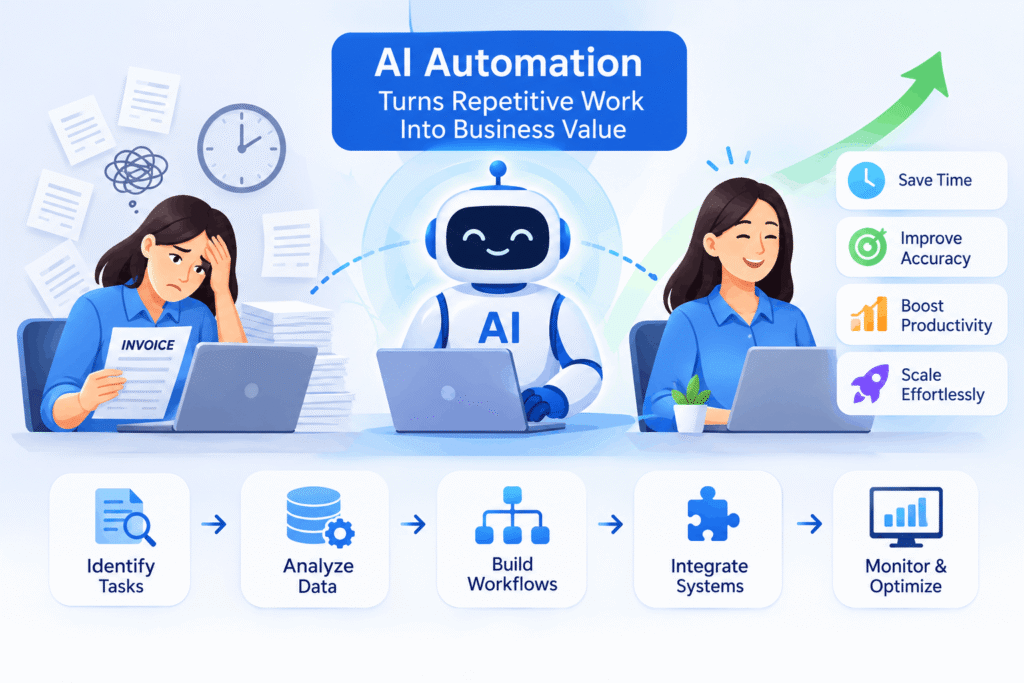
A finance department that deals with a couple of hundred invoices per month never views it as an issue. They open the email, check the invoice amount, compare it to the purchase order, and send it up the chain for approval. It works fine until the volume doubles, a critical member is on vacation, or just a typo causes the payment to be made to the wrong account. The work isn’t difficult. It’s just constant, and it quietly takes the hours your best people should be spending elsewhere.
Rule-based tools fixed part of this years ago, but they only cope when the input looks exactly as expected. However, real-life processes do not work like that. Suppliers present invoices in various formats, clients describe the same problem in ten different ways, and exceptions appear daily. All these aspects are dealt with in AI-based process automation when it understands the incoming data, makes decisions according to predefined boundaries, and completes a series of actions autonomously.
If you are thinking of adopting AI automation for your company, the following sections will provide all necessary information about the process itself, the right starting point, and common pitfalls.
Why Businesses Need AI Automation for Repetitive Processes
Nobody serious is trying to take people out of the business. The point is to stop using skilled employees for work a system can handle.
Reduce Manual Work and Operational Costs
Repetitive work costs more than the hours on a timesheet. There’s rework when something goes wrong, there’s waiting while tasks sit in a queue, and there’s the extra hire who exists only because volume went up. Automation chips away at all three.
Improve Accuracy and Minimize Human Errors
Type the same fields for two hours, and you will slip. That’s human, not a character flaw. One transposed digit in a financial record can take longer to hunt down than the entry took to make. A workflow runs the same checks on item one thousand as on item one.
Increase Employee Productivity
Take the routine away, and people spend the time on analysis, on customers, on problems that need a thinking person. Morale usually lifts too, which matters when good staff is hard to replace.
Speed Up Business Operations and Decision-Making
A manual process moves at the speed of someone’s inbox. Automated ones don’t wait for the morning, so approvals, reports, and replies arrive sooner. Managers get figures while they can still act on them.
Support Business Growth Without Increasing Workloads
More orders bring more tickets, more paperwork, more reconciliation. If every jump in volume needs another hire, growth gets expensive fast. Automation loosens the link between revenue and headcount.
How AI Workflow Automation Works
Projects that succeed tend to follow roughly the same order. The ones that stall usually skip a step.
Identify Repetitive Tasks and Business Requirements
Find out where the time goes. You’re looking for work that is frequent, rule-heavy, and prone to delays. Talk to the people who do it daily. They know where the friction is, and no process diagram will beat that.
Collect and Analyze Business Data
Gather real examples: old invoices, tickets, forms, plus the correct outcome for each. You’ll see how much variation the system has to cope with, and whether your data is tidy enough to build on. Sometimes it isn’t. Learning that early is cheap, and learning it after launch is not.
Build Automated Workflows Using AI Models
Split the process into steps. Use AI where something needs interpreting, like reading a document, classifying a request, or drafting a reply. Use plain rules for the rest. The result is more predictable and costs less to run.
Connect AI Agents With Existing Business Systems
A workflow that lives outside your core software only creates another place to copy and paste from. Agents need controlled access to the systems where your data already lives, so results turn up where your team looks for them.
Monitor Performance and Improve Workflow Outcomes
Going live starts the tuning period. Watch accuracy, processing time, and how often people have to step in. Those numbers tell you whether you need clearer instructions, better data, or tighter limits.
Common Business Processes You Can Automate With AI
You could automate nearly anything. These are the areas where results show up quickest.
Customer Support and Query Management
Requests can be sorted by topic and urgency, simple questions answered straight away, and replies drafted for agents to check. Sensitive cases go to a person with the full history attached, so customers don’t repeat themselves.
Data Entry and Document Processing
Data entry and documentation are currently performed manually in contracts, forms, and receipts. A workflow may extract the information and validate it against your rules. Employees work only with exceptions.
Sales and Lead Management
Lead scoring, CRM updates, follow-ups, and call reporting may be automated completely. Sales representatives talk to leads instead of filling in the paperwork.
Employee Onboarding and HR Operations
Employee onboarding includes a complex chain of small tasks: document submission, account setup, appointment booking. Workflow automation ensures that the chain doesn’t break and onboarding week for new hires becomes more pleasant.
Invoice Processing and Financial Reporting
Workflow may match invoices with purchase orders, spot discrepancies, and prepare regular reports on schedule. Month-end closes faster and books become more accurate.
Appointment Scheduling and Meeting Management
Appointment booking, scheduling adjustments, reminder notifications, and follow-up notes cause endless messaging. Workflow automation reduces the messages and usually eliminates the no-shows.
Inventory Management and Order Processing
Workflows may monitor stock levels, reorder products, and process orders automatically. Stockouts and delays become rare occurrences.
Practical Examples of AI Workflow Automation Across Industries
The ideas carry from sector to sector. The paperwork and regulations are what change.
Healthcare: Automating Patient Records and Appointment Workflows
Intake forms, record updates, and appointment reminders can be automated, which gives clinical staff time back. Patient data is regulated, so settle the privacy requirements for your region before building anything.
Retail: Streamlining Inventory and Customer Service
Connecting stock data with order handling keeps listings accurate, and routine customer questions get answered without a wait. Your people deal with the unusual cases.
Banking: Automating Document Verification and Transaction Workflows
Document checks get faster and odd transactions can be flagged for review. Any decision with compliance weight should still end with a person.
Manufacturing: Improving Production and Supply Chain Operations
Workflows can follow supplier updates, estimate material needs, and warn about delays early. Planners get a window to react before the line is affected.
IT and Software: Automating Ticket Management and Internal Support
Tickets get categorized, prioritized, and routed on arrival, and common ones like password resets can be closed automatically. Engineers keep their focus for problems that need real investigation.
Professional Services: Simplifying Client Communication and Reporting
Draft reports, meeting summaries, and scheduled client updates can be generated for you. Consultants spend more hours advising and fewer formatting slides.
How to Implement AI Automation in Your Business
AI automation implementation works best in small, measurable steps. Big-bang rollouts tend to disappoint.
Step 1: Identify Processes That Need Automation
Rank processes by volume, time spent, and error rate. Good first candidates are frequent, well understood, and a constant irritation.
Step 2: Define Clear Automation Goals
Decide what “better” means before you build. Faster turnaround, fewer errors, lower cost per transaction: any of these works if you can measure it. The goal drives every design decision after it.
Step 3: Choose the Right AI Automation Technologies
Match the tool to the job. A simple rule doesn’t need a language model, and a genuine judgment call shouldn’t rest on a basic script. Weigh security, scalability, and how easily each option connects to what you already run.
Step 4: Integrate AI With Existing Business Systems
Plan this early. Work out how data moves, who can see what, and what happens when a connected application gets updated or replaced.
Step 5: Test Workflows Before Full Deployment
Run the workflow on real historical cases, then in a small pilot. Testing surfaces edge cases that no planning meeting will predict.
Step 6: Train Employees to Work Alongside AI
People need to know what the system does, when to trust it, and when to override it. Teams who understand the workflow adopt it faster and spot problems earlier.
Step 7: Monitor Results and Optimize Performance
Check the numbers on a schedule and adjust. A workflow nobody revisits slowly drifts away from how the business really operates.
Best Practices for Building Effective AI-Powered Workflows
Projects that deliver tend to share a few habits.
Start With High-Impact, Low-Complexity Processes
An early win builds trust and helps pay for the next project. Pick something with clear inputs, clear outputs, and results people can see.
Keep Human Approval for Critical Decisions
Payments, contract terms, and anything touching customer rights should pass through a person. Let the system prepare the recommendation, and let someone accountable confirm it.
Prioritize Data Quality and Security
Clean data improves everything downstream, so fix obvious problems first. Give each workflow access to what it needs and nothing beyond that.
Build Scalable and Flexible Workflows
Assume things will change. Modular workflows are easier to adjust when volumes grow, rules shift, or a connected tool gets swapped out.
Track Performance Through Measurable KPIs
Useful measures include processing time, error rate, exception rate, cost per transaction, and hours saved. Compare against the baseline you recorded before launch, or the improvement will be hard to prove.
How Stellen Infotech Helps Businesses Implement AI Workflow Automation
Automation works when technology follows the business, not the reverse. Stellen Infotech works as a software development partner and starts from your processes, not from a product list.
AI Automation Solutions Designed Around Business Needs
Ready-made workflows rarely fit without changes. The work begins by understanding your processes, your constraints, and the outcome you want, and the automation is designed around those.
Custom AI Agent Automation for Repetitive Operations
Where a process needs judgment across several steps, custom agents can be built with defined roles, limits, and approval points. The repetitive effort disappears, and your team stays in control.
Connecting AI Workflows With Existing Business Applications
Automation that can’t talk to your current software just becomes another silo. Connecting workflows to the applications your teams already use keeps data consistent.
Building Scalable Agentic Workflows for Growing Businesses
A workflow should handle more volume and new requirements without a rebuild. Planning for that early protects the original investment.
Supporting Businesses Through AI Integration and Implementation
Support covers the whole path: choosing processes, testing, deployment, and tuning afterward. That helps you sidestep most of the pitfalls above.
What Is the Future of AI Workflow Automation?
Nobody can predict the details, but the direction is already clear from how early adopters work.
The Growing Role of Autonomous AI Agents
Agents will take on longer chains of tasks with less supervision. Companies that build solid governance now will be able to extend that trust safely later.
Agentic AI and Self-Managing Business Workflows
Expect workflows that track their own performance, point out weak spots, and suggest fixes. People will spend less time running processes and more time supervising and improving them.
Human and AI Collaboration in Modern Workplaces
The strongest teams will treat AI as a capable assistant. People bring judgment, empathy, and accountability. The system brings speed and volume.
How AI Will Transform Business Operations in the Coming Years
Look for shorter cycle times, data that feeds everyday decisions, and operations teams that spend less effort on coordination. Companies that start small and learn early will adapt more easily than those waiting for the perfect moment.
Conclusion: Make Business Processes Smarter With AI Workflow Automation
The goal isn’t to automate everything. It’s to pick the right processes, pair them with suitable technology, and keep people involved where judgment matters. Done that way, AI workflow automation cuts repetitive work, improves accuracy, and leaves teams more room to focus on growth.
The companies that get the most out of it build one reliable workflow at a time and treat it as a lasting capability. So where would you begin? Which process in your business takes the most hours for the least return?
If you’re ready to explore AI automation implementation, Stellen Infotech can help you find the right opportunities and build workflows that fit how your business actually runs.