Mobile apps have evolved far beyond simple screens, forms, and notifications. Modern applications can use artificial intelligence, cloud services, real-time data, connected devices, biometrics, advanced graphics, and platform-specific capabilities to deliver highly personalized experiences.
At the same time, development teams have more choices than ever when selecting a technology stack. A business can build separate native applications for Android and iOS, use a cross-platform framework, share selected code through a multiplatform approach, or combine mobile technologies with cloud and AI services.
So, what technologies are used in modern mobile app development?
The answer depends on the type of application, target platforms, performance requirements, features, budget, development team, and long-term maintenance plans.
This guide covers the major technologies used today and explains where each approach can make sense.
What Technologies Are Used in Mobile App Development?
Modern mobile applications usually combine several technologies rather than relying on a single programming language or framework.
| Development Area | Common Technologies |
|---|---|
| Android Development | Kotlin, Android SDK, Jetpack Compose |
| iOS Development | Swift, SwiftUI, Xcode |
| Cross-Platform Development | Flutter, React Native |
| Multiplatform Development | Kotlin Multiplatform, Compose Multiplatform |
| Backend Development | Java, Node.js, .NET, Python |
| APIs | REST, GraphQL |
| Cloud Services | AWS, Microsoft Azure, Google Cloud |
| Databases | PostgreSQL, MySQL, MongoDB, Firebase and others |
| Artificial Intelligence | AI APIs, machine learning frameworks, on-device AI |
| Security | Biometrics, encryption, authentication, secure APIs |
| Testing | Unit testing, UI testing, automated testing, device testing |
| Monitoring | Crash reporting, performance monitoring, analytics |
The right combination depends on the application. A banking app, social platform, e-commerce application, IoT solution, and enterprise mobility app can all require very different technology stacks.
1. Native Mobile App Development
Native development means building an application specifically for a particular operating system using its preferred development tools and technologies.
The two dominant mobile platforms are Android and iOS.
Android Development
Kotlin is the primary language used for modern Android development.
Android development also commonly involves the Android SDK and Jetpack libraries. Jetpack Compose provides a modern declarative approach to building Android user interfaces.
Native Android development can be a strong choice when an application needs deep access to Android features, platform-specific functionality, or highly optimized performance.
iOS Development
Swift is Apple’s modern programming language for application development.
For the user interface, SwiftUI provides a declarative framework for building applications across Apple platforms. Apple continues to expand SwiftUI with new capabilities as its platform ecosystem evolves.
Native iOS development is often appropriate when an application needs precise control over the Apple ecosystem, platform-specific features, or a highly customized iOS experience.
When should you choose native development?
Native development can make sense when you need:
- Maximum platform-specific control
- High-performance applications
- Advanced device capabilities
- Specialized hardware integrations
- Complex animations or graphics
- Platform-specific user experiences
- Early access to new operating-system capabilities
The trade-off is that building separate Android and iOS applications usually means maintaining separate codebases and development workflows.
2. Cross-Platform Mobile App Development
Cross-platform development allows teams to build applications for multiple operating systems while sharing a significant amount of code.
Popular technologies include:
- Flutter
- React Native
- .NET MAUI
- Other cross-platform frameworks
The main attraction is code reuse.
Instead of maintaining completely separate implementations for Android and iOS, developers can share application logic and, depending on the framework, parts or most of the user interface.
Flutter
Flutter uses Dart and provides a framework for building applications from a shared codebase.
It can be useful when a team wants consistent UI behavior across platforms and needs to move quickly while maintaining a single development environment.
React Native
React Native uses JavaScript or TypeScript and is particularly familiar to teams that already work with React.
Its modern architecture has continued to evolve, with the New Architecture becoming the default for React Native projects from version 0.76 onward.
When should you choose cross-platform development?
Cross-platform development can be a good option when:
- You need both Android and iOS applications
- A large portion of functionality can be shared
- Development speed is important
- You want to reduce duplicated development work
- Your team already has relevant cross-platform expertise
- The application does not depend heavily on platform-specific functionality
However, cross-platform does not automatically mean better or cheaper. The decision should consider performance, integrations, native APIs, team skills, testing, and long-term maintenance.
3. Kotlin Multiplatform
Kotlin Multiplatform takes a different approach to cross-platform development.
Instead of requiring an application to be completely shared, teams can decide which parts of the application should be shared and which should remain platform-specific.
For example, a development team might share:
- Business logic
- Data models
- Networking
- Authentication
- Validation
- Data access
while keeping the user interface native on Android and iOS.
Kotlin Multiplatform can also be combined with Compose Multiplatform when teams want to share UI code. The technology supports gradual adoption, meaning an existing application does not necessarily have to be rewritten from scratch.
This flexibility makes multiplatform development particularly interesting for teams that want code reuse without giving up access to native platform capabilities.
4. AI and Machine Learning in Mobile Apps
Artificial intelligence has become one of the most significant developments in mobile application technology.
However, AI in mobile apps is no longer limited to simple chatbots.
Modern applications can use AI for:
- Personalized recommendations
- Intelligent search
- Voice interactions
- Image and document analysis
- Content generation
- Predictive features
- Customer support
- Fraud detection
- Smart notifications
- AI assistants
- Workflow automation
Generative AI
Generative AI can allow mobile applications to create or transform content based on user input.
For example, an application could help users:
- Summarize documents
- Generate product descriptions
- Draft messages
- Analyze information
- Ask questions about their data
- Interact with an AI assistant
The implementation can involve cloud-based AI models, application APIs, or a combination of both.
On-Device AI
Another important direction is running some AI capabilities directly on the device.
On-device processing can provide advantages such as:
- Lower latency
- Better offline functionality
- Reduced data transmission
- Greater privacy for certain use cases
- More responsive interactions
This does not mean every AI workload should run on a smartphone. Larger models and complex tasks may still be better suited to cloud infrastructure.
The practical approach is often to decide which processing belongs on the device and which belongs in the cloud.
AI Agents in Mobile Applications
AI is also moving toward more action-oriented experiences.
Instead of simply answering a question, an AI system can potentially help users complete multi-step tasks by interacting with tools, data, and application functionality.
This is an emerging area, so businesses should evaluate security, permissions, reliability, privacy, and human oversight carefully before allowing AI systems to perform actions on behalf of users.
5. Cloud and Backend Technologies
A mobile application rarely operates by itself.
Most feature-rich apps communicate with backend systems that handle authentication, business logic, databases, payments, notifications, analytics, and other services.
A simplified architecture might look like this:
Mobile App → API → Backend → Database → Cloud Services
Common technologies include:
- REST APIs
- GraphQL
- Java
- Node.js
- .NET
- Python
- PostgreSQL
- MySQL
- MongoDB
- Cloud databases
- Serverless services
Cloud infrastructure can also help applications scale as usage increases.
For example, an e-commerce app may use mobile technologies for the customer experience while its backend manages products, orders, payments, customer accounts, inventory, and notifications.
This is why mobile app development increasingly involves both mobile engineering and backend architecture.
6. IoT Integration
Mobile applications can also act as interfaces for connected devices.
In an IoT-based solution, the mobile application may communicate with sensors, appliances, vehicles, wearables, or industrial equipment.
A typical architecture could look like:
Connected Device → Network → Cloud/Backend → Mobile App
Examples include:
- Smart home applications
- Fitness and wearable applications
- Connected vehicle platforms
- Industrial monitoring systems
- Smart appliances
- Healthcare devices
- Asset tracking systems
The mobile application becomes the user’s interface for viewing data, receiving alerts, controlling devices, or managing connected services.
7. AR, VR and Immersive Mobile Experiences
Augmented and virtual reality can add another layer of interaction to mobile applications.
Augmented Reality
AR can overlay digital information onto the physical environment.
Potential applications include:
- Furniture visualization
- Retail product previews
- Navigation
- Education
- Tourism
- Training
- Product demonstrations
For example, a furniture retailer could allow customers to see how a product might look inside their room before purchasing it.
Virtual Reality
VR provides a more immersive environment and can be useful for:
- Gaming
- Training
- Education
- Simulations
- Virtual experiences
Not every application needs AR or VR. These technologies are most valuable when immersive interaction solves a genuine user problem.
8. Mobile App Security and Privacy
Security should not be treated as a temporary mobile development trend. It should be part of the application architecture from the beginning.
Mobile applications often handle sensitive information such as personal data, payment information, location, authentication credentials, and business information.
Important security technologies and practices include:
- Biometric authentication
- Multi-factor authentication
- Encryption
- Secure API communication
- Secure data storage
- Access controls
- Token-based authentication
- Application security testing
- Dependency management
- Secure coding practices
Privacy also needs to be considered when applications collect location, contacts, images, microphone data, or other sensitive information.
The right approach is to collect only the information the application actually needs and clearly communicate how that information is used.
9. Adaptive Interfaces and Foldable Devices
Mobile applications no longer need to be designed around a single screen size.
Users may access applications on:
- Traditional smartphones
- Foldable phones
- Tablets
- Large-screen devices
- Different orientations
- Devices with multiple window configurations
This makes responsive and adaptive UI design increasingly important.
Instead of building an interface for one fixed screen, developers should consider how layouts behave when the available space changes.
This can improve usability across different devices without requiring an entirely separate interface for every screen configuration.
The broader lesson is that modern mobile apps need to be flexible rather than tied to one device format.
10. Mobile App Testing and Performance Technologies
A mobile application can look excellent and still fail if it crashes, loads slowly, drains the battery, or behaves differently across devices.
Testing therefore needs to happen throughout development.
Common approaches include:
- Unit testing
- Integration testing
- UI testing
- Automated testing
- Performance testing
- Security testing
- Device compatibility testing
- Network testing
- Regression testing
Performance monitoring can also help teams identify crashes, slow screens, memory issues, and other problems after an application is released.
Testing is particularly important for applications that need to support multiple operating systems and a wide range of devices.
11. APIs and Third-Party Integrations
Modern mobile applications rarely exist in isolation.
They often need to connect with external systems such as:
- Payment gateways
- CRM platforms
- Maps
- Social platforms
- Analytics tools
- Marketing platforms
- Identity providers
- Enterprise software
- AI services
APIs provide the connection between the mobile application and these external systems.
REST remains widely used, while GraphQL can be useful when applications need more flexible control over the data requested from backend services.
The important consideration is not simply which API technology is used, but whether the overall integration architecture is secure, reliable, scalable, and easy to maintain.
How Do You Choose the Right Mobile App Development Technology?
There is no single technology that is best for every mobile application.
The right choice depends on the project’s requirements.
| Requirement | Possible Approach |
|---|---|
| Maximum platform-specific control | Native development |
| Android application | Kotlin |
| iOS application | Swift |
| Android and iOS with shared code | Flutter / React Native |
| Shared business logic with native UI | Kotlin Multiplatform |
| AI-powered application | Native or cross-platform + AI services |
| IoT application | Mobile + backend + IoT infrastructure |
| Enterprise mobile application | Architecture based on business requirements |
| Highly specialized device features | Native development |
Before choosing a technology, consider:
Target platforms
Do you need Android, iOS, or both?
Application complexity
Is the app a relatively simple consumer application or a complex enterprise platform with multiple integrations?
Performance requirements
Does the application involve intensive graphics, real-time processing, or specialized hardware?
Device capabilities
Will you need cameras, GPS, Bluetooth, biometrics, sensors, NFC, or other device features?
Development resources
What technologies does your existing team already know?
Time to market
Do you need to release Android and iOS applications simultaneously?
Long-term maintenance
Who will maintain the application after launch, and how easy will it be to update?
Scalability
Will the application need to support a growing number of users, transactions, devices, or integrations?
These questions are more useful than simply choosing the technology that is currently receiving the most attention.
Native vs Cross-Platform: Which Approach Is Better?
The answer depends on the project.
Native development provides maximum control over each platform and can be ideal for performance-intensive or highly specialized applications.
Cross-platform development can reduce duplicated development work when an application needs to support multiple platforms and much of its functionality can be shared.
Kotlin Multiplatform provides another option by allowing teams to share selected application logic while retaining native code where it matters.
The best approach is therefore the one that balances performance, development speed, platform requirements, budget, and long-term maintenance.
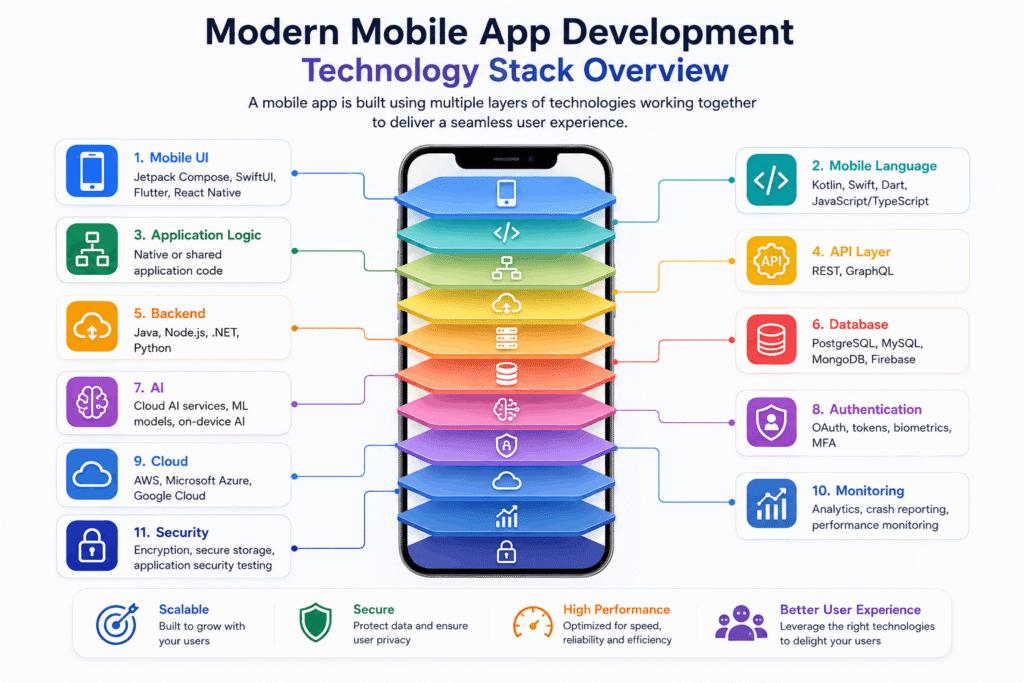
What Does a Modern Mobile App Technology Stack Look Like?
A modern application can combine several layers:
| Layer | Common Technologies |
|---|---|
| Mobile UI | Jetpack Compose, SwiftUI, Flutter, React Native |
| Mobile Language | Kotlin, Swift, Dart, JavaScript / TypeScript |
| Application Logic | Native or shared application code |
| API Layer | REST, GraphQL |
| Backend | Java, Node.js, .NET, Python |
| Database | PostgreSQL, MySQL, MongoDB, Firebase |
| AI | Cloud AI services, ML models, on-device AI |
| Authentication | OAuth, tokens, biometrics, MFA |
| Cloud | AWS, Azure, Google Cloud |
| Monitoring | Analytics, crash reporting, performance monitoring |
| Security | Encryption, secure storage, application security testing |
The stack is not fixed.
A small consumer application might need only a few of these components, while an enterprise application could require nearly all of them.
The Future of Mobile App Development
Mobile development is moving toward applications that are more intelligent, connected, adaptive, and personalized.
AI will continue to influence how users interact with applications, while on-device processing can make some experiences faster and more private.
Cross-platform and multiplatform approaches will continue to give teams more choices for sharing code across Android and iOS. At the same time, native development will remain important when applications require precise platform control.
Cloud services, APIs, connected devices, adaptive interfaces, and stronger security practices will also remain important parts of the mobile development ecosystem.
Rather than following every new technology trend, businesses should focus on building a technology stack that supports their users and business objectives.
Frequently Asked Questions
What technologies are used in mobile app development?
Mobile applications can use a combination of native languages such as Kotlin and Swift, cross-platform frameworks such as Flutter and React Native, multiplatform technologies such as Kotlin Multiplatform, backend technologies, APIs, databases, cloud services, AI tools, and security technologies.
Which technology is best for mobile app development?
There is no universally best technology. Native development can be suitable when platform-specific performance and functionality are important, while cross-platform or multiplatform development can be useful when businesses need to support Android and iOS with shared code.
Which language is used for Android app development?
Kotlin is the primary language for modern Android development. Android applications can also use Java, particularly in existing projects and legacy codebases.
Which language is used for iOS app development?
Swift is Apple’s primary modern programming language for iOS and other Apple-platform applications. SwiftUI can be used to create user interfaces across Apple’s platforms.
Is Flutter good for mobile app development?
Flutter can be a good option for teams that want to build applications for multiple platforms from a shared codebase. The right choice still depends on the application’s requirements, native integrations, team expertise, and long-term maintenance needs.
Is React Native still used for mobile app development?
Yes. React Native remains an established cross-platform option. Its modern architecture has continued to evolve and is now enabled by default in React Native projects.
What is Kotlin Multiplatform used for?
Kotlin Multiplatform allows developers to share code across platforms such as Android and iOS while retaining the ability to use platform-specific code when necessary. Teams can share business logic, data layers, or other components without necessarily rebuilding the entire application.
Can AI be integrated into mobile apps?
Yes. AI can be integrated into mobile applications through cloud-based APIs, backend services, machine learning models, and in some cases on-device AI. Common applications include intelligent search, recommendations, assistants, content generation, image analysis, and automation.
What backend technologies are used for mobile applications?
Mobile applications can connect to backend systems built with technologies such as Java, Node.js, .NET, or Python. These backend systems typically manage APIs, authentication, business logic, databases, integrations, and other server-side functions.
How do I choose the right mobile app development technology?
Start with the application’s requirements rather than the technology. Consider target platforms, features, performance, device capabilities, integrations, development resources, budget, time to market, scalability, and long-term maintenance before choosing the technology stack.
Build a Mobile App With the Right Technology Stack
Choosing the right technology is an important part of mobile application development, but it is only one part of the process.
The application’s architecture, UX, backend, integrations, security, testing, deployment, and ongoing maintenance all contribute to its success.
Stellen Infotech provides mobile application solutions for businesses looking to build custom mobile experiences for their customers, employees, and business operations. The company also provides enterprise mobility solutions, including mobile application development, mobile UX/UI, testing, security, and integration services.
Whether you are starting a new mobile application or modernizing an existing one, the right approach is to evaluate the business requirements first and then select the technologies that support them.