
How-to-Use-Custom-Web-Applications-to-Improve-Your-Business
June 2, 2023

How Custom Web Applications Can Improve Your Business

Read More

A custom web application can help a business automate repetitive work, connect different systems, manage information more efficiently, and create digital experiences around its specific processes.

Unlike off-the-shelf software, a custom web application is built around the way your business actually operates. That makes it useful when standard tools do not provide the functionality, integrations, or workflows your team needs.

But building a custom application is not automatically the right choice for every business. The real question is whether a custom solution can solve a problem that existing software cannot solve efficiently.

In this guide, weโ€™ll look at what custom web applications are, how they can improve business operations, what you can build with them, and when investing in one makes sense.

What Is a Custom Web Application?

A custom web application is software developed specifically for a business, its users, and its operational requirements. Unlike a standard website, a web application allows users to interact with data, complete tasks, manage workflows, or use business-specific functionality through a web browser.

Examples include:

  • Customer portals
  • CRM systems
  • Employee portals
  • Inventory management systems
  • Booking platforms
  • Project management tools
  • Document management systems
  • B2B and B2C portals
  • Business process automation platforms

For example, a company that currently manages customer requests through emails and spreadsheets could build a web application where customers submit requests, employees manage them, and managers track progress from a centralized dashboard.

That is where custom web application development becomes valuable. The software is designed around the business process rather than forcing the business to change its process to fit a generic tool.

Website vs Web Application: What’s the Difference?

A website and a web application may both run in a browser, but they serve different purposes.

A website is generally designed to provide information. A company website, blog, service website, or portfolio is a typical example.

A web application is designed for interaction. Users can log in, submit information, manage records, complete tasks, make bookings, access dashboards, or interact with business systems.

For example:

Website:
A customer visits a company’s website to learn about its services.

Web application:
The same customer logs into a portal to place an order, check its status, download an invoice, or submit a support request.

If your business needs users to perform actions rather than simply consume information, a web application may be the more suitable solution.

Custom Web Application vs Off-the-Shelf Software

Before investing in custom development, it is worth asking whether an existing software product can already solve the problem.

Factor Custom Web Application Off-the-Shelf Software
Business workflows Built around your processes You adapt processes to the software
Features Developed according to requirements Predefined features
Integrations Can be designed around your systems Depends on available integrations
User experience Fully customizable Limited to available options
Scalability Can be planned around business requirements Depends on the provider
Initial investment Usually higher Usually lower
Best suited for Unique or complex requirements Standard business needs

Off-the-shelf software can be the better choice when your requirements are straightforward and an existing product already does what you need.

Custom development becomes more attractive when your workflows are unique, several systems need to work together, or existing software creates more limitations than solutions.

How Can a Custom Web Application Improve Your Business?

The biggest value of a custom web application is not the technology itself. It is what the application allows your business to do more efficiently.
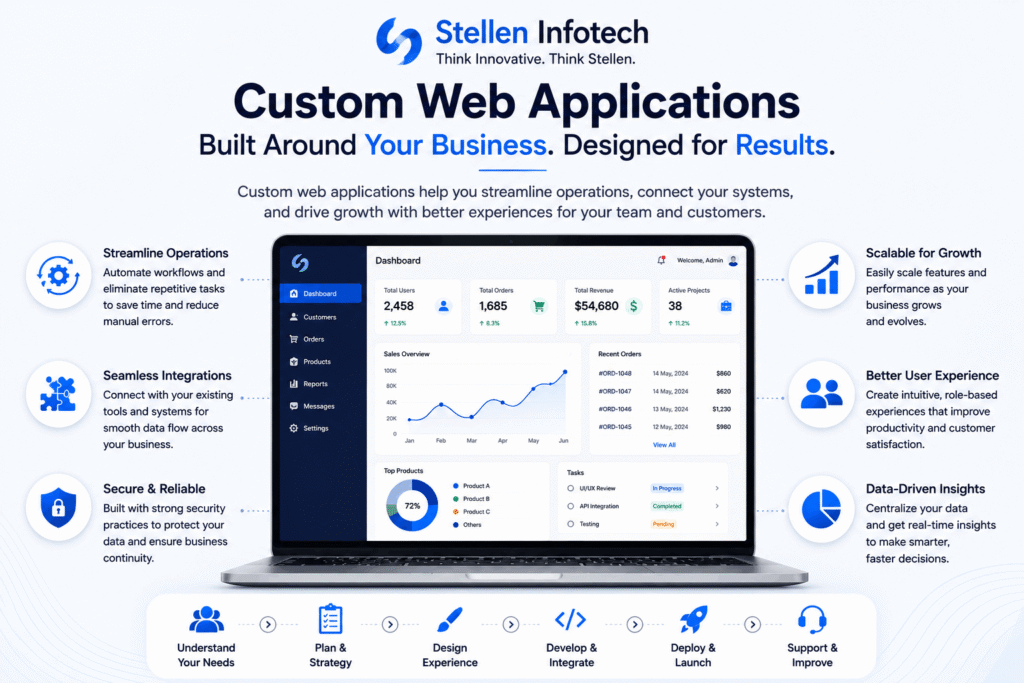
Custom Web Application

1. Automate Repetitive Business Processes

Many businesses still rely on manual data entry, spreadsheets, emails, and repetitive approval processes.

A custom web application can automate parts of these workflows.

For example, an application could automatically:

  • Assign tasks to employees
  • Send notifications
  • Generate reports
  • Update records
  • Route approval requests
  • Create invoices
  • Track customer requests
  • Move information between connected systems

Automation can reduce repetitive work and give employees more time to focus on tasks that require human judgment.

The goal is not to automate everything. It is to identify processes where manual work creates unnecessary delays, duplication, or errors.

2. Build Workflows Around Your Business

Every business has its own way of handling customers, employees, orders, approvals, documents, or internal operations.

Off-the-shelf software may not always match those workflows.

A custom application can be designed around the process your business already follows.

For example, a manufacturing company may need a workflow that moves an order through quotation, approval, production, quality checking, dispatch, and delivery. Instead of managing each stage through separate tools, a custom application can bring the workflow into one system.

This can make responsibilities clearer and give teams better visibility into what is happening at each stage.

3. Connect Different Business Systems

Businesses often use multiple tools for different functions, such as CRM, accounting, payments, inventory, marketing, and customer support.

The problem starts when these systems do not communicate properly.

Employees may have to copy information from one system to another, which takes time and creates opportunities for errors.

A custom web application can integrate with existing systems through APIs and other integration methods.

For example, a business could connect its:

Website โ†’ CRM โ†’ Payment Gateway โ†’ Inventory System โ†’ Accounting Software

When these systems work together, information can move between them without requiring employees to repeatedly enter the same data.

4. Centralize Business Data

Important information can become difficult to manage when it is spread across spreadsheets, emails, individual software tools, and separate databases.

A custom application can bring relevant information into a centralized environment.

Depending on the application, employees could use dashboards to view:

  • Customer information
  • Sales activity
  • Orders
  • Inventory
  • Tasks
  • Project status
  • Financial or operational reports
  • Support requests

Having information available in one place can make it easier for teams to find what they need and make decisions using current data.

5. Improve Customer Experience

Custom web applications are not limited to internal business processes.

They can also create better digital experiences for customers.

For example, a customer portal can allow users to:

  • Create an account
  • View orders
  • Track requests
  • Download documents
  • Update account information
  • Make payments
  • Submit support tickets
  • Communicate with the business

Instead of relying on employees to handle every request manually, customers can complete common tasks themselves.

This can make the experience faster and more convenient while reducing repetitive support work.

6. Support Business Growth

A custom application can be designed with future requirements in mind.

As the business grows, you may need:

  • More users
  • New workflows
  • Additional integrations
  • New dashboards
  • More automation
  • Additional user roles
  • New customer-facing features

A well-planned application can be expanded as these requirements emerge.

However, scalability should be considered during architecture and development. Simply building a larger application does not guarantee that it will scale well.

7. Improve Collaboration Between Teams

When different departments work with separate information and processes, communication can become difficult.

A centralized web application can give employees access to the same information based on their roles and permissions.

For example, sales can update customer information, operations can manage fulfillment, and management can view relevant reports without relying on separate spreadsheets or long email threads.

Role-based access also means users can see the information and functions they actually need.

8. Give Your Business More Control Over Functionality

One of the biggest differences between custom and off-the-shelf software is control.

With a custom application, functionality can be developed around your requirements rather than being limited to the features provided by a software vendor.

This can be useful when your business has a process that is difficult to handle with standard software.

However, more control also means more responsibility. A custom application needs proper development, testing, security updates, monitoring, and ongoing maintenance.

What Can You Build With a Custom Web Application?

Custom web applications can support a wide range of business requirements.

Customer Portals

A customer portal can give users a secure place to manage accounts, orders, documents, payments, and support requests.

CRM Systems

A custom CRM can organize customer information, leads, sales activities, follow-ups, and reporting around the company’s sales process.

Inventory Management Systems

Businesses can use custom applications to manage inventory, stock movements, orders, suppliers, and related operational workflows.

Employee Portals

An employee portal can centralize internal resources, requests, documents, communication, approvals, and other HR or operational processes.

Project Management Applications

Teams can manage projects, tasks, deadlines, resources, documents, and progress through a centralized platform.

Booking and Reservation Platforms

Custom booking applications can manage availability, reservations, payments, notifications, and customer information according to specific business rules.

B2B and B2C Portals

Businesses can build portals for customers, suppliers, distributors, partners, or other users who need controlled access to products, services, data, or workflows.

When Does Your Business Need a Custom Web Application?

A custom web application may be worth considering when your business faces problems that standard software cannot address effectively.

Some common signs include:

  • Employees spend significant time on repetitive data entry
  • Your team relies heavily on spreadsheets for core processes
  • Several systems contain duplicated information
  • Your existing software does not match your workflow
  • Customers need a dedicated online portal
  • Manual approvals are slowing down operations
  • You need integrations that standard software does not support
  • Your business has unique processes or rules
  • You need functionality that cannot be provided by existing SaaS products

The important point is to start with the business problem, not the technology.

If a custom application does not solve a meaningful operational or customer problem, there may be little reason to build one.

When Is Off-the-Shelf Software a Better Choice?

Custom development is not always the best option.

An existing SaaS or off-the-shelf product may be more appropriate when:

  • Your requirements are standard
  • A reliable product already solves your problem
  • You need to launch quickly
  • Your budget does not justify custom development
  • You do not need extensive integrations
  • Your workflows are unlikely to require significant customization

For example, if your business only needs standard project management functionality and an established platform already meets those requirements, building a new project management system may not make financial or operational sense.

Custom development should have a clear business justification.

How Much Does a Custom Web Application Cost?

There is no fixed price for custom web application development because every project has different requirements.

The overall cost can depend on:

  • Number of features
  • Application complexity
  • Number of user roles
  • UI and UX requirements
  • Third-party integrations
  • Backend architecture
  • Security requirements
  • Testing requirements
  • Number of platforms or devices
  • Ongoing maintenance

A simple internal application will have very different requirements from a large customer portal connected to multiple business systems.

The best way to estimate the cost is to first define the business requirements and prioritize the features needed for the initial release.

How to Build a Custom Web Application

A successful application starts with understanding the problem it needs to solve.

A typical development process includes:

1. Define the Business Requirements

Identify the problem, users, workflows, required features, integrations, and expected outcomes.

2. Plan the Application

Define the technology architecture, database structure, user roles, integrations, project scope, and development priorities.

3. Design the User Experience

Create the interface and user flows around how people will actually use the application.

4. Develop and Test

Develop the application while testing functionality, performance, compatibility, security, and usability.

5. Deploy the Application

Once the application has been tested and approved, it can be deployed for its intended users.

6. Maintain and Improve

After launch, applications require monitoring, security updates, bug fixes, performance improvements, and new features as business requirements change.

Is a Custom Web Application Worth the Investment?

A custom web application can be a valuable investment when it solves a specific business problem and produces measurable operational or customer benefits.

The strongest business cases usually involve reducing manual work, connecting disconnected systems, improving access to information, supporting complex workflows, or creating functionality that existing software cannot provide.

The decision should therefore be based on the expected business value rather than simply the number of features an application can have.

Frequently Asked Questions

What is a custom web application?

A custom web application is software developed specifically around a business’s workflows, users, requirements, and processes. It can support functions such as customer portals, CRM, inventory management, bookings, reporting, and business process automation.

What are the benefits of custom web applications?

Custom web applications can help businesses automate repetitive processes, connect systems, centralize data, improve customer experiences, support unique workflows, and provide functionality that standard software may not offer.

Is a custom web application better than SaaS software?

Not always. SaaS is often the better choice when standard functionality meets your requirements. Custom development makes more sense when your business has unique workflows, integration requirements, or functionality that existing software cannot provide.

Are custom web applications secure?

Security depends on how an application is designed, developed, deployed, and maintained. Measures such as authentication, role-based access control, encryption, secure coding practices, testing, monitoring, and regular updates can help protect the application and its data.

How long does it take to build a custom web application?

The development timeline depends on the application’s complexity, features, integrations, design requirements, testing needs, and project scope. A simple application may take considerably less time than a large enterprise platform with multiple integrations and user roles.

Can a custom web application integrate with existing software?

Yes. Custom web applications can integrate with other systems using APIs and other integration methods. This can allow businesses to exchange information between systems such as CRM, accounting, payment, inventory, and other business platforms.

How much does custom web application development cost?

The cost depends on the scope and complexity of the project. Features, integrations, user roles, design, security, testing, and ongoing maintenance can all affect the final cost. A requirements assessment is needed to provide a meaningful estimate.

Build a Web Application Around Your Business

A custom web application should do more than add another piece of software to your business. It should solve a real problem, simplify workflows, connect the systems you already use, or create a better experience for your customers and employees.

If your business has requirements that standard software cannot handle effectively, Stellen Infotech provides web application development services for custom business applications, portals, integrations, and enterprise solutions.

The first step is to define the problem you want the application to solve, then determine whether custom development is the right solution for it.

How to Optimize Your PHP Website
May 17, 2023

How to Optimize Your PHP Website for Speed & Performance

Read More

Having a website that loads quickly and gives optimum performance is crucial for any successful business in todayโ€™s fast pacing digital world. Essentially, web developers constantly look out for relevant ways to improve the performance of their websites & applications. Optimizing website performance has become a critically important aspect of web development with the linear increase in faster and more efficient web experiences. PHP Web Development Services offer effective strategies and techniques that can help you Optimize your PHP Website for optimal speed and performance.

Slow-loading websites not only frustrate visitors but also impact search engine rankings adversely. So in this blog post, we will be exploring best practices and practical steps to optimize your PHP website. We will be covering a range of strategies that can significantly enhance your websiteโ€™s speed as well as performance. So, letโ€™s dive in and discover them together below.

Ways To Optimize Your Php Website For Speed And Performance

Optimizing a PHP website for speed and performance involves various techniques and strategies. Here are some effective ways to improve the performance of your PHP website.

Deploy PHP On Cloud Hosting:

In order to supercharge your PHP website take it to the cloud. By doing so, you can unlock a world of possibilities. Sign up for a cloud hosting provider supporting PHP thus creating a virtual machine/instance to deploy a PHP website on cloud hosting. Further, PHP website development allows configuring it with the necessary specifications. The next step is to transfer the website files, configure a database if necessary and ultimately connect your domain for easy access.

Improve Code For Better Process:

Following coding standards, optimizing database queries, and handling errors properly are some beginning criteria to improve your PHP coding. Furthermore, you can modularize code, optimize loops and file handling, validate input data, test, and refactor regularly to attain perfection. These practices will enhance the efficiency, maintainability and performance of your PHP website.

Update Php Version:

It is recommended to follow a systematic process to update your PHP version. Firstly, check your current PHP version using a PHP file with the phpinfo()function. Next, in order to make sure that your site will continue to function correctly after the update, verify the compatibility of the code. Also, check for associated libraries or frameworks with the target PHP version. Make sure to back up your code, configurations, and other pertinent data to prevent any potential loss or disruptions. To safely update your PHP version, custom PHP web development follows the documentation and guidelines provided by your hosting provider or PHP community.

Optimize Database Queries:

The performance and efficiency of your PHP website can be improved by optimizing database queries. Analyze your queries and identify the areas for improvement. Make sure that your queries are properly indexed and avoid using unnecessary joins or subqueries. Consider only the necessary data to be fetched from the database. Additionally, monitor and analyze query execution times using database profiling tools which can provide valuable insights into query performance. Maintain and update your database statistics and indexes on a regular basis for optimum performance.


Monitor & Optimize Server Performance:

It is genuinely essential to monitor and optimize server performance for the smooth and efficient operation of your PHP site. Utilize server monitoring tools to track the key metrics as these provide real-time insights into the health and performance of your server. Furthermore, PHP web development analyzes the collected data to identify areas of high resource consumption or spikes in activity that could impact performance. Optimize server configuration by adjusting settings and also consider implementing caching mechanisms to reduce the load on the server to improve response times. Review and fine-tune your server configuration based on performance monitoring data regularly. This ensures optimal performance and scalability of your PHP website.

File Compression & Minification:

You can significantly reduce the size of your files by compressing and minifying them which results in faster loading times and improved user experience. Use tools like UglifyJS or Closure Compiler to compress CSS and JavaScript files. This removes unnecessary characters, whitespace, and comments to reduce file size without affecting functionality. Enable GZIP compression on your server for additional file compression during transmission and faster downloads. Minify your code to remove unnecessary characters, improving parsing and execution speed.

Conclusion:

To deliver a seamless user experience and ultimately achieve better search engine rankings, optimizing the speed & performance of your PHP website is necessary. You can significantly enhance the efficiency of your PHP code, improve database interactions and optimize server performance by implementing the various strategies discussed above. Reap the benefits of an optimized PHP website by trusting PHP web development services to handle the intricacies of optimization. Your PHP site will dazzle users with its lightning-fast performance with enhanced scalability and security. Watch your PHP site thrive like never before while soaring to new heights in the cloud.

What-are-the-Advanced-Database-Techniques-for-Web-Development
May 9, 2023

What are the Advanced Database Techniques for web development?

Read More

Millions of data are generated and stored in a database every single day. This makes it essential to manage databases for apps and software as an integral part of web development and administration. As the era of web development has evolved over the years throughout the world, so have the techniques to manage the database. Furthermore, it has given rise to the popularity of Offshore Web Development Services in India. These services allow the businessman to delegate web development to an offshore database administrator and save both money as well as time.

Nowadays, advanced database techniques have taken over the web development world to manage (fetch, store, update, and optimize) data in the database. Plus, these advanced database features ensure your applications run fast and enhance their performance, reliability, and security. Read on to know about advanced database techniques for web development.

List Of Advanced Database Technologies

Let’s read about some of the advanced database technologies for web development.

Database Optimization Techniques

Well-optimized database plays a vital role in the overall performance of web-based applications.  Here, advanced database optimization techniques come into the picture which includes

  • Indexing: Adding an index to the column of tables (Indexing) will help you to search easily, reduces response time & resource usage, and improves query performance.
  • Denormalization: Adding redundant data to one or more tables helps to improve the query response and optimize the read performance of a database.
  • Caching: Database caching is a technique where multiple copies of frequently-queried data are stored in the cache (temporary location) to retrieve them promptly.
  • Partitioning: Dividing the large tables into smaller ones helps the query process fewer data and run queries faster.

Database Security Features

Database security or database auditing is a critical part of web development. So, it’s better to employ a web application development company and let the professionals handle such an integral part of your software development. Let’s have a look at the database security features

  • Authentication: It is a process of identifying whether the user who tries to log in to the database is allowed to do so.
  • Authorization: It is a process where the data administrator determines whether the access given to users is right or not.
  • Encryption: Data encryption is a process where data is encrypted and can be decoded by a user who has the encryption key or authority to do so.

Querying Techniques

Query optimization improves the performance of the overall database system and provides users with faster results.

  • Use EXPLAIN Keyword: Using EXPLAIN with SELECT, DELETE, REPLACE, INSERT, and UPDATE statements give you information about the query execution plan (steps involved in executing the statement).
  • Use Subqueries: Nesting query inside another query helps for complex queries that require data from several tables. Also, it saves you time to write separate queries to retrieve or process data from multiple tables.
  • Use Joins: Using joins to retrieve data from multiple tables at a time. They are comparatively faster than the subqueries and provide faster data retrieval. 

Complex Data Structures

Complex data structures can store and manipulate multiple data in a single variable, which improves the efficiency to manage a large amount of data.

  • Use JSON File Format: It is used to store and transfer human-generated temporary data objects containing value pair attributes and arrays.
  • Use XML File Format: It is used to store and transport data between web applications and databases in machine-readable format. XML is more secure than JSON.
  • Object-Relational Mapping: ORM is a programming technique to convert data from relational databases and object-oriented languages. It helps the developers of a web development agency to write less code which reduces your cost to hire website development services.

Big Data Analytical Techniques

Big data technologies are used to manage all types of datasets in large volumes. It automates some of the tasks and faster the web development process which reduces the cost and provides the best ever personalized user experience.

  • Data Mining: It is a process of fetching and discovering patterns and relationships in large data sets using statistical and machine learning techniques. Data mining techniques can be used for tasks such as association rule mining, clustering, and classification.
  • Data Visualization: It is a process of creating visual representations of data like charts, graphs, and maps to help users better understand and interpret large data sets.
  • Natural Language Processing: NLP is a branch of AI  that focuses on the interactions between computers and humans through natural language. It enables computers to understand, generate, and manipulate human language and can be used for sentiment analysis, language translation, and text classification.

Conclusion

Advanced database techniques should bean integral part of web development. These database techniques help developers to efficiently store and manipulate large amounts of data. Furthermore, it increases application performance and provides personalized experiences for database users. As technology continues to evolve, it is important to stay up-to-date with the latest database techniques. Here, it makes complete sense to hire a web application development company and implement them straight away in order to deliver robust, scalable, and efficient web applications.

Key Steps Business Owners Should Know
May 2, 2023

Key Steps Business Owners Should Know To Boost User Engagement

Read More

In todayโ€™s digital world, people are exposed to millions of online products & services. They have options to choose, use, discard and switch from one product to another in no time. This makes it essential to develop effective Local SEO Strategies to increase your product’s visibility and grab people’s attention & boost user engagement. However, the aim should not only be to attract customers but also to educate and entertain them, so that they use your products daily. Here, a custom web development company comes into play.

Professional web developers and designers can create engaging, personalized, unique websites for your products. They will build a website or application that meets your clientโ€™s needs and provide them with the best user journey. Such impressive user experience can make your customers take action and refer your products and services to friends, family, relatives and colleagues.

In a few words, as a business owner, your ultimate goal is to make your customers use your products every single day. And of course, make those products an integral part of their lives. In this write-up, we will provide some customer-centred tips that every business owner should implement immediately.

Tips To Provide The Best User Experience & Increase User Engagement

Here are the tips to make your websites, applications, and software more engaging.

Understand Your Users

The first and foremost step to implementing user engagement strategies is to know your audience. This includes knowing who your target audience is and what they are looking for. Plus, it will also give you an idea about how satisfied they are and how often they are using your products. Basically, there are several types of users who use your products or interact with your services on a regular basis.

Some might be free users who are using only the free trials, while others might be paying for your services. Either way, you need a different approach to treat them differently. After all, the better you know your users, the better you can implement marketing tactics. Furthermore, it will help you to retain your visitors to your websites and increase user engagement.

Provides Personalized User Experience

Some users use your products on a daily basis and are known as active users. You can not promote your features to such users until and unless there is something new and exciting, which can impress them to upgrade. On the other hand, there might be some users who have registered once but have not used your products in a long time. Here, you need to promote your exciting features and products to influence them, so they re-login to your website and make a purchase. Whatever the situation is, you need a personalized approach for your different users.

Moreover, you can use some analytical and user behavior-tracking tools to gather information about your existing and potential users. After analyzing their behavior, recommend some personalized products and customized emails with their names, so they feel special and give you a second chance. To create an engaging user experience, use personalized on boarding and build a tailored and unique journey for your users. If you are not familiar with such tools, you can hire web development services to do it for your custom web development needs.

Automate Triggered Messages

Activating triggered messages is a powerful tactic to boost your user engagement. This means, replying to the customers with a personalized message depending on their actions while exploring your websites. Here, user actions can include, searching for specific products in your digital store, adding items to carts, etc. Besides, personalized messaging strategies can motivate your users to review, reply, purchase or share the products on their social media handles.

Use Omnichannel Marketing Tactics

Omnichannel marketing strategies build excellent communication with the user. It provides a seamless customer journey on all channels and breaks down all the barriers between marketing channels and products. Moreover, using an omnichannel marketing strategy improves customer purchase chances on all channels. All in all, improving the customer experience increases the chances of sales and increases retention rates.

Enables Your Users To Communicate

You can use the in-app chat interface to help the customers. These efficient tools allow the users to chat in person to resolve any queries they may have while using your products. It helps the business to understand usersโ€™ difficulties while using your products and improve the features to provide a better customer experience.

Build Emotional Connection With Videos

Compelling, helpful and informational content is the backbone of user engagement. No doubt, blog posts, guides and eBooks are the most common content types. However, using videos is a faster and more effective way to storytelling to build an emotional connection with the user. With the help of visual aids, you can grab the attention of your users and leave a strong impression on your users.

Get Feedback From In-App Survey

Embedding in-app survey tools in your application allows you to target the right user at a right time. These surveys help you to get continuous feedback from users and target the users based on the information gathered from user feedback. In-app survey tools make it possible to target the audience in a more personalised way. These tools provide you with the proper information about your user’s activities on your sites. Furthermore, such information allows you to target those users depending on their actions and behavior.

Offer Incentives and Rewards

Offering incentives and rewards for your customers is not a new concept for business to attract their users. It is also known as gamification and attracts users to engage with the services while collecting incentives. For example, you can give your users some rewards when they unlock new features in your apps. They can save these rewards and further use them to get discounts on paying monthly subscriptions.

So, make sure to ask your website development company to build an effective gamification loop for your app. It will help you to make your website more engaging and plays a significant role in boosting your user engagement.

Conclusion

Boosting user engagement requires a strategic approach. This involves focusing on user-centered design, creating compelling videos, providing personalized experiences, offering rewards, and providing personalized on boarding. Besides, you can hire a custom web development company to create engaging websites, products and services. These professional developers and designers know how to implement a customer-centered design approach and provide the best on boarding experience for users.

Technologies-for-B2B-E-commerce-Solutions
April 26, 2023

Helpful Technologies for B2B E-commerce Solutions

Read More

B2B E-Commerce has transformed the way businesses have been operating. Their introduction has provided greater speed, convenience, and efficiency in the procurement process. E-business solutions are becoming the most adopted method to conduct transactions between businesses. In todayโ€™s fast-evolving business world, more and more companies are moving towards online sales. E-commerce and B2B solutions help businesses interact with each other on the digital marketplace.

In this blog post, we will throw light on various technologies employed for various business models. These can enhance customer experience, increase sales, and ultimately lower costs. From e-commerce platforms and CRM software to AI and Blockchain we will be taking a deeper look at these technologies. These technologies can provide solutions for B2B e-commerce to stay at the forefront of the business race.

Technologies for B2B E-Commerce

The essential technologies that can assist in increasing sales, reducing costs, and raising customer satisfaction are listed below:

Robust B2B eCommerce Platform

A robust B2B eCommerce platform is essential for businesses selling their products and services online. These platforms must allow businesses to lay down customized prices lists for existing and new customers. It must generate quotes for custom orders.

Various tools must be provided by the platform in order to manage customer relationships, track and manage orders conveniently, secure payment processing, etc. The platform must be designed in such a fashion so as to support multiple currencies and languages making it easy for customers from around the world to interact with.

Real-Time Integration With Enterprise Resource Planning (ERP) Software

Every organization presently uses ERP software to keep a check on different aspects of the business. Be it finance, accounting, supply chain, inventory planning, and other related areas. It is most likely that you must have also deployed the one for the same. By integrating your B2B eCommerce platform and CRM tool with your ERP system, you can automate business processes, improve data accuracy and gain deeper customer insights.

There are numerous benefits of real-time integration with ERP software. It can improve the decision-making process, increase efficiency and enhance collaboration across various departments. It also enables informed decision-making by providing valuable real-time insights into operations and supply chains.

Third-Party Logistics Integration

In order to improve customer satisfaction and further optimize supply chain operations, third-party logistics integration is an essential technology. This involves coupling an organizationโ€™s systems and processes with a third-party logistics provider, Thus enabling seamless data and exchange of information.

The overall improved customer satisfaction depends upon greater visibility into the supply chain which in turn facilitates tracking of inventory and shipments. A well-managed integration of third-party logistics allows a direct reduction in documentation with online dispatch paperwork and billing also.

eCommerce Syndication

In B2B solutions, a technology termed as eCommerce syndication is used to distribute information from one retailerโ€™s website to other online marketplaces. The other purposes served by it are a comparison of various shopping engines and affiliated websites. It allows businesses to reach a wide era of audience, increase their visibility and drive more sales as a result.

There are a variety of tools and techniques that can be used to facilitate e-commerce syndication. Some of these include Product Information Management(PIM) systems, Data Feed Management, API integration, and Third Party syndication services are most commonly used.

Omnichannel Personalization

This is a well-known technology in B2B e-commerce to provide a personalized experience to customers. It is applicable across multiple channels including web, mobile social media, email, and more. Thus allowing businesses to engage with customers on a deeper level which improves customer satisfaction and ultimately increases sales.

There are a number of technologies that can assist omnichannel personalization. These include Customer Data Platforms, Customer Relationship Management (CRM), Artificial intelligence, Marketing Automation, and Content Management Systems (CMS). By deploying the right tools at the right time businesses can engage more and more customers thus increasing revenues.

Dealer Locator or Dealer Portal

This technology connects buyers with local dealers and distributors. Customers are guided toward the nearest dealer or distributor who can provide the product and services in demand. Incorporating a dealer locator on your website or creating co-branded dealer portals can be an effective way of supporting your dealers.

These strategies can help prevent direct competition by creating a mutually beneficial situation where everyone in the channel can thrive. When customers promote your products through word of mouth, it can help connect more and more consumers and ultimately, aid in the success for all parties involved.

Sales Reps Dashboard

These dashboards provide sales representatives with real-time information and insights. This helps them to optimize their sales processes and further improve customer relationships. It typically consolidates data from multiple sources and marketing automation tools into a single, user-friendly interface.

Although your e-commerce website can facilitate daily transactions, building relationships often requires one-on-one communication between your sales team and buyers. This is critical to guarantee that you are fulfilling your customers’ requirements and providing them with the best possible services.

Conclusion

To sum up, B2B e-commerce is increasingly becoming necessary for businesses to run. It is thus essential to take advantage of the right technology solutions to optimize processes and increase growth. The above blog discussed the 7 most essential technologies that have proven to be incredible in todayโ€™s times.

These technologies can optimize the user experience and can help boost revenues. To keep your business surviving in this competitive era, staying up to date with the latest trends in the market is a must. These powerful technologies enable B2B and e-commerce solutions to become more engaging, efficient, and productive.

So, do not hesitate to take advantage of these tools and stay ahead of the curve!

How-local-seo-can-drive-traffic
April 18, 2023

How Local SEO Can Drive Traffic: Targeting The Right Audience

Read More

Local SEO is becoming increasingly popular as more and more business owners are looking and aiming to reach local customers. After all, driving more local traffic to your website is important to attain higher sales, maximize profit levels, and generate a high ROI. By following impactful Local SEO Strategies you can increase your overall digital visibility in local searches made by potential customers. With this, you can drive more qualified leads toward your potential offerings and increase the likelihood of converting them into regular customers.

This article will provide an in-depth look at the Local SEO strategies you can employ to drive more website traffic. This write-up will cover website on-page optimization, local directory listing, and geo-targeted advertising. Furthermore, you’ll gain insights into optimizing your website for local search and crafting customer-focused local content.

Local SEO Strategies For Increased Traffic In-Store

Here are five impactful local search engine optimization strategies to boost foot traffic. These SEO strategies can help businesses encourage customers for impulsive purchases and generate more sales.

1. Identify Different Market Terms Of Your Offerings:

It is important to assess the terms and phrases that your local customers use to describe your brand’s products and services. Conducting keyword research is paramount to finding a stock of valuable words or phrases your customers might be searching for. Next is to determine the best ones you can use on your website to target your potential customers. While determining the potential keywords or phrases, it is important to identify location-specific keywords with high search volume. With this, analyzing the effectiveness of each is helpful to select the best ones to target accordingly.

2 .Website On-Page Optimization For Local Search Results:

A websiteโ€™s on-page optimization is the process of optimizing the essential elements on your web page. This is important to make your website more visible on search engines and more relevant to potential users. There are four elements that should be properly and wisely optimized to make sure that the web page is mobile-friendly and responsive. These elements include:

Website Content

This includes ascertaining that the content on the website is relevant, interesting, and easy to understand for the user. Also, the potential selected keywords are strategically mapped in the content on the individual pages of your website.

Page Title And Meta Description

The page title and meta description of your website should be unique and compelling and include high search volume keywords. This will increase the chances of search engines ranking your web page in the top search results for answering user search queries.

Internal Linking

Adding internal links strategically between various pages on your website helps to improve the overall structure and navigation of your website. Additionally, this can enable website visitors to find related information and resources more efficiently. As a result, it provides them with a better user experience.

Image Optimization

Optimizing visuals and other multimedia on the website is important to maximize the siteโ€™s loading speed and superior performance. The image file should be compressed well and the file name should include keywords relevant to the image. This is important to help search engine crawlers identify your image content easily and display them in relevant search results.

Proper optimization of these website elements is essential to achieve success in improving your siteโ€™s visibility on search engines. Qualified professionals of Local SEO Services providers possess advanced knowledge in optimizing these elements finely. Taking help from these expert professionals can help ascertain a higher website ranking on search engines. This will allow more and more local people to find and reach out to you for products and services easily.

3. Utilize Geo-Targeted Advertising:

Geo-targeted advertising is a strategic technique local businesses should use to reach more of their target audience according to their geographic location. This type of advertising is an excellent way for businesses to spread awareness of their products and services. Targeting ads to your customers in specific geographic areas increases the likelihood of attracting them to your website. Additionally, this encourages them to convert into paying customers.

4. Be Listed on Local Directories:

Local businesses seeking to drive more website traffic increasingly prioritize listing on local directories. These platforms facilitate easy discovery by potential customers conducting online searches. Also, this is a great way for them to create more brand awareness locally and reach existing and tap into new customers. You can take advantage of affordable Local SEO packages offered by qualified professionals providing listing services. The professionals will help you pass through filing out crucial details like business name, website URL, address, contact number, and more.

5. Positive Reviews And Ratings:

Positive reviews and ratings on your website are an effective local SEO strategy to experience more traffic and lead generation. Customers look at the reviews and ratings of the products and services before making a decisive choice towards attaining them. Positive, happy, and satisfied customer reviews on your website will greatly boost your brand’s reputation. Additionally, this can also help it rank higher in local search results and encourage visitors to become regular customers.

Conclusion

These were the five impactful local SEO strategies. Following these can ultimately help you drive more traffic to your website and expand your reach to local customers. Achieving visible results requires the correct implementation of these strategies. Stellen Infotech is a leading and experienced local SEO company providing a range of optimization services. Our specialists will employ the strategies discussed above to improve your local business’s digital presence in local search results. This way more and more local customers can reach out to you and avail of your brandโ€™s products and services.


Virtual-Assistants-and-Chatbots
April 13, 2023

Virtual Assistants and Chatbots: The Future of Customer Service

Read More

Businesses have been consistently looking for new and creative ways to improve their customer service experience in the age of digital transformation. The creation of chatbots and virtual assistants is one of the most interesting and promising trends in this area. These intelligent software programmes engage with users, comprehend their needs, and provide tailored assistance using artificial intelligence, machine learning, and natural language processing technologies.

Implementing AI technologies like a chatbot system or virtual assistants can change the face of customer services in several industries. They are already quickly changing how Software Development Company connect with their customers thanks to their availability around-the-clock, quick responses, and cost-effectiveness. In this article, we’ll examine the advantages of these technologies, and look at some concrete instances. Weโ€™ll also talk about how they’re influencing customer service in the future.

How Virtual Assistants and Chatbots Help Enhance Customer Experience

By streamlining the entire process, virtual assistants and chatbots have the potential to revolutionise customer service. The following are some ways that chatbots and virtual assistants might enhance customer service:

24/7 Availability

The primary advantage of virtual assistants and chatbots is their 24/7 availability. Regardless of their location, you can offer 24/7 customer service thanks to these technologies. This can be especially helpful for businesses that operate in many time zones because it guarantees that clients can access it from anywhere.

Speedy Response Time

Chatbots and virtual assistants are designed to respond to consumer enquiries quickly. They use natural language processing (NLP) and artificial intelligence (AI) to rapidly and effectively interpret and answer client inquiries. Chatbots and virtual assistants can shorten wait times and increase customer satisfaction by giving clients quick responses to their queries.

Personalised Service

Chatbots and virtual assistants can be programmed to offer consumers individualised services. They can gain knowledge from their contacts with customers and apply this knowledge to customise their responses to the unique needs of each client. This could enhance customer service and foster closer ties with clients. Moreover, to provide personalised recommendations or promotions, virtual assistants and chatbots keep track of user history & preferences, further enriching the customer experience.

Multilingual Support

To expand your customer base and serve a wider audience itโ€™s crucial to interact in their native language. Virtual assistants and chatbots may provide multilingual customer service, making them a great choice for companies with a worldwide clientele. With this, you can overcome the obstacle of language barriers and serve a wider spectrum of clients and increase customer happiness. Furthermore, it is especially beneficial for firms operating in multiple nations as it enables companies to deliver consistent service throughout several regions.

Cost-Effective

Chatbots and virtual assistants are efficient customer service options. They can handle a lot of queries at once and require less staffing than conventional customer support techniques. This implies that companies can reduce employee expenses while maintaining effective customer service. Moreover, they can also be used across a variety of channels, including social media, email, and chat platforms. This further gives organisations a thorough and economical approach to customer care.

Scalability

When it comes to scalability, virtual assistants and chatbots are capable of handling a huge volume of customer queries without needing extra staff. Therefore, they are a great option for companies that suffer seasonal or unexpected increases in client demand. For instance, they can aid firms in managing the increasing client enquiries without overloading their support employees at busy times like Black Friday.

Analytics and Insights

If you integrate a virtual assistant and or a chatbot for business, you can gather insightful statistics regarding how customers behave. Moreover, by examining consumer feedback and interactions you can pinpoint common problematic areas, enhance their goods or services, and streamline their support procedures. Plus, youโ€™ll be able to monitor client satisfaction and sentiment and evaluate the success of their customer service initiatives.

Customer Self-Service

With chatbots and virtual assistants, you can facilitate customer self-service, allowing customers to easily fix their issues. You may cut wait times and increase productivity by giving clients self-service options. For instance, chatbots and virtual assistants can offer FAQs or informative articles to clients so they can find the answers to their questions promptly. This enhances both the client experience and the workload of support employees, freeing them up to concentrate on more difficult problems.

Improved Customer Loyalty

Needless to say, by offering a seamless and customised customer experience, virtual assistants and chatbots can assist organisations in increasing customer loyalty. You may increase the likelihood of repeat business and referrals by providing 24/7 support, individualised advice, and quick response times. Moreover, it helps pinpoint areas for improvement and streamline customer service procedures to give customers an even better experience.

The Bottom Line

In the article above, we learned how chatbots and virtual assistants are effective solutions for enhancing customer support. Employing them can help businesses offer individualised, round-the-clock help using these services in a cost-effective and efficient manner, increasing client retention and satisfaction. If you want to provide your customers with exceptional service, you can opt for the best chatbot development services. Because we can anticipate these technologies to become more potent and sophisticated with the change in the digital landscape.

April 7, 2023

10 Common Website Security Vulnerabilities You Need to Know

Read More

With rapid development and digitalization, it has become essential for every business to have a website. However, the convenience of the online website comes with its share of risks like increasing the risk of cybercrime. The last thing a website owner wants is for their website to fall prey to cybercrime and lose critical data and consumers’ trust. But the good news is that you can protect your website from the most prevalent website security flaws by taking preventive measures. For that, you need to be aware of the major website security threats and vulnerabilities to ensure necessary safeguards.

This blog discusses the 10 common website security vulnerabilities that you should know to protect the safety and security of your website. Hiring reliable Web Development Services can help you avoid or fix these vulnerabilities in your website ensuring great security and user experience. So fasten your seat belts because you are about to go on a ride to ascertain and fix the bumps in your website.

Common Website Security Vulnerabilities That Need Your Attention

In this section, weโ€™ll cover the major vulnerabilities that you need to keep in mind to keep your website secure and running smoothly.

SQL Injection

One of the most prevalent website security flaws is SQL Injection. It happens when hackers introduce harmful SQL code into a website’s input fields, such as login or search boxes. The website’s database then runs the code, enabling attackers to sneak around authentication and access private data.

SQL injection attacks can lead to severe consequences like data leakage and identity theft. As a website owner, you should employ parameterized SQL queries. This protects the user input and keeps hackers from inserting dangerous code. Web applications should also be kept up to date, and security updates should be applied as soon as they are made available.

Cross-Site Scripting (XSS)

Cross-Site Scripting, also known as XSS, is a vulnerability threat that occurs when hackers insert harmful scripts into the HTML code of a website. These scripts are then performed on the victim’s browser, giving the attackers access to user accounts or sensitive data.

There are varied ways an XSS attack can take place. Reflected XSS attack is when an attacker sends a malicious script in a URL. Another way is the Stored XSS attack in which the malicious script sent in the URL gets stored on the websiteโ€™s server. Itโ€™s crucial to sanitize the user input and escape characters to stop attackers from injecting dangerous codes into your website.

Broken Authentication and Session Management

In this type of security breach, attackers target weak authentication systems and session management. This vulnerability arises when website users use weak or outdated authentication mechanisms or fail to properly manage user sessions. These flaws could give attackers access to user accounts, sensitive information, and other nefarious activities.

To avoid these issues, web developers can implement strong and safe authentication mechanisms, like multi-factor authentication. Make sure that the user sessions expire shortly to improve session security. Moreover, introduce strict password policies that require users to change their passwords regularly and choose strong passwords.

Broken Access Control

When web designers neglect to appropriately restrict access to particular portions of their websites, access control vulnerabilities are created. Attackers may leverage these flaws to change user data, obtain unauthorized access to confidential information, or carry out other nefarious deeds.

Website owners should implement role-based access control mechanisms that restrict user access to only the siteโ€™s portions they require to execute their jobs. Moreover, it’s crucial to examine access control procedures on a regular basis and to remove users’ access privileges who no longer require them.

Security Misconfiguration

Web application vulnerabilities like security misconfiguration surface when you fail to properly configure your web applications and servers. These flaws could provide attackers access without authorization, reveal confidential information, and enable them to engage in other destructive actions.

To avoid this risk, itโ€™s crucial to adhere to the industry standards for security practices and web application and server configuration. This includes turning off unused services and ports, changing default passwords and account information, and routinely installing security patches and upgrades.

Insufficient Cryptography

Insufficient cryptography is a vulnerability that arises due to weak encryption algorithms or failure to manage cryptographic keys. Attackers may be able to access confidential data without authorization if your website shows this vulnerability.

If you donโ€™t want to lose your data to such security breaches, then employ strong encryption algorithms like AES. Plus, make sure that the cryptographic keys are managed properly and stored securely. Website security testing can help you ascertain such vulnerabilities and you can improve them by upgrading your encryption policies.

Insecure Communication

When websites employ unencrypted communication routes, like HTTP rather than HTTPS, they result in insecure communication. Via these insecure channels, attackers can intercept and manipulate data, posing a risk for data theft, identity theft, and other security issues.

Website operators should utilize HTTPS to encrypt all data exchanged between the website and its users in order to prevent communication vulnerabilities. With end-to-end encryption provided by HTTPS, the data in transit is shielded against interception and tampering.

Insecure Password Storage

Using poor hashing methods that are simple for attackers to crack or storing user passwords in plain text are two examples of insecure password storage problems. These flaws could provide attackers access to user accounts and the ability to obtain user passwords.

Therefore, you must use strong and secure hashing algorithms like bcrypt or scrypt to avert insecure password storage vulnerabilities. Moreover, you can also enforce strict password policies.

File Inclusion Vulnerabilities

Web applications that don’t properly sanitize user input may include external files like scripts or templates, which can lead to file inclusion vulnerabilities. These deficiencies can be used by attackers to run harmful codes or get access to confidential data.

As web designers, you need to sanitize your user input and validate all file inclusion to ensure that they are safe and secure. Plus, make sure to keep your web application updated and promptly apply the security patches as they are released.

Cross-Site Request Forgery (CSRF)

Cross-site request forgery (CSRF) happens when attackers persuade users to act on a website without their knowledge or agreement. A few examples of CSRF are making illicit transactions, altering user settings, or deleting user data. This can be detrimental to the security of your userโ€™s data.

Website owners should use anti-CSRF tokens that authenticate each request and stop attackers from faking requests to stop CSRF attacks. To further reduce the risk, it’s critical to install additional security measures like rate limitation and session timeouts. Plus, itโ€™s crucial to educate users about the dangers of CSRF attacks.

The Bottom Line

In the blog above, we discussed the 10 common website security vulnerabilities that every website owner should know. We covered the issues and also talked about the reasons they occur in the first place. Moreover, we also provided you with the appropriate solutions to deal with them. We can understand that these issues are highly technical and itโ€™s difficult for not techy people to grab them. But fret not, if you are not familiar with these vulnerabilities, you can always hire web development services to secure your site.

March 29, 2023

Comparing the differences between GA4 and UA: A Quick Guide

Read More

The realm of digital analytics is undergoing significant changes in 2023. Google Analytics 4 (GA4) is replacing Universal Analytics (UA or GA3), with which many of us are familiar. 

It means if you’re not turned over by then, you’ll lose access to Google Analytics’ amazing features. It’s overwhelming to see so much change in a little time. Don’t worryโ€”there are many resources to ease the move.

If you are unsure about where to begin with web analytics, you can contact your service provider or look for resources online. You can convert to GA4 before the deadline and keep analytics information streaming with a little work and guidance.

Are you attempting to distinguish between Google Analytics 4 (GA4) and Universal Analytics (UA)? If so, you’ve arrived at the right place! 

This guide will assist you in understanding the fundamental distinctions between the two and how to leverage them to your advantage when offering search engine optimization services. Let’s jump in!

Overview of Google Analytics 4 and Universal Analytics 

Universal Analytics (UA) and Google Analytics 4 (GA4) are two of the most common web analytics and tracking tools. Top SEO Experts utilize both to evaluate website performance and user engagement. GA4, released in October 2020, is the latest version of Google Analytics and has several new features and enhancements over UA. Many businesses still use Google Analytics’ 2013 legacy version, UA.

Significant differences between GA4 and UA

Occurrence based GA4 vs. UA Sessions

Google Analytics 4 is the most recent version of its popular analytics tool, and it employs “cookie-based” tracking. This means that when a user visits your website, a cookie is saved in their browser, allowing you to follow their online activities.

This is an excellent way to acquire information about user activity, such as which pages, they visit and how long they spend on each page. Google Analytics 4 uses Google signals in addition to first-party cookies.

Google will be able to learn more about your website’s demographics and user behavior as a result. By integrating this data with additional analytics data, you may gain even more valuable insights about your website’s users and make more informed decisions about your website. Google Analytics 4 is therefore highly recommended if you’re wanting to optimize your website analytics.

Session Calculation

One major distinction between UA and GA4 is their session values. UA and GA4 assess sessions in different ways, which can result in figures that differ slightly. UA may define a session as a single visit from a single user, whereas GA4 may define a session as a sequence of visits from the same user. 

Hence, if you contrast the two methods side by side, the results are likely to differ slightly. It is vital to keep this in mind while comparing numbers, as it can have a considerable impact on the outcomes. The good news is that both UA and GA4 are trustworthy data providers, so if you need accurate numbers, you can rely on both.

Pricing

You should compare the pricing for Google Analytics 4 (GA4) vs Universal Analytics before deciding which analytics platform to utilize (UA). GA4 is free up to 10 million hits per month, whereas UA is free up to 500,000 hits per month. One system may be more expense than the other based on the amount of data you need to monitor. Consider the advantages and cons before making a decision.

GA4 has many capabilities that UA doesn’t, including stream-based data collecting, increased machine learning, and better connectivity with other Google tools. But UA has been around longer, so there is greater support accessible if you have any problems. Ultimately, it is a decision to make which platform best suits your specific requirements.

Storage Limit

It’s fun to compare analytics tools, especially data storage ones. Let’s compare Universal Analytics (UA) and Google Analytics 4 in this instance (GA4). GA4 retains event data for a maximum of 14 months, whereas UA stores data for up to 50 months. This can make a big difference for archiving.

If you want a long-term perspective of your data, UA is the way to go. Alternatively, if you need more recent data that is simpler to analyze in the short term, GA4 may be a better option. In either case, it is vital that you comprehend the data storage restrictions of the solutions you are evaluating.

Due to its extensive feature set, GA4 is quickly becoming one of the most popular choices among leading SEO experts

Do In-Depth Research Using Google Analytics 4

If you desire a deeper level of research and insights, Google Analytics 4 (GA4) is your best option. With its Exploration reports, it raises the bar for advanced analytics. Using Universal Analytics, you may create custom reports and employ secondary dimensions to gain insight.

Yet, with GA4, you can explore your data and acquire sophisticated insights in ways that were before impossible. Exploration reports provide predictive analysis, data visualization, and user behavior insights. This helps you make better business and marketing decisions.

Summary

Google Analytics 4 (GA4) and Universal Analytics (UA) are two of the most well-known analytics tools currently available. With a simpler interface and improved tracking, GA4 is more user-friendly than UA. The optimal analytics platform for your business will depend largely on your demands and objectives.

Contact our Search Engine Marketing team if you have any issues concerning GA4 and Universal Analytics. They’ll gladly answer your inquiries and provide the information you need to choose a platform.

March 28, 2023

10 Technical SEO Factors That Should Be Monitored Wisely

Read More

The Search Engine Result Page (SERP) landscape and Reliable SEO Services are ever-evolving. Robust website optimization is crucial for the modern digital establishment of your business. Moreover, several technical SEO factors must be considered to ensure a highly functional, appealing, and responsive website. On top of that, monitoring these pivotal factors regularly is even more important for a smooth-running website.

Technical SEO factors monitoring helps businesses ensure to stay ahead of their competitors. Further, strengthens and maximizes their website’s visibility and performance on SERP. This article will explore six critical technical SEO factors requiring vigilant monitoring. Keyword audit, site page speed, crawlability, indexability, and renderability contribute to a refined website.

There are some more factors that youโ€™ll see in detail further. So, letโ€™s get ahead and understand these pivotal factors more closely.

Essential Technical SEO Factors To Monitor Wisely

XML Sitemap, keyword cannibalization, websiteโ€™s mobile-friendliness, and image optimization are some factors that we will discuss in brief in this write-up. Read through to get started and see more factors that are to be taken into account for excellent website performance.

XML Sitemap

XML Sitemaps consist of properly formatted XML files containing a site’s URLs. They also include additional metadata for each URL, aiding search engines in site crawling. A website’s sitemap ensures easy discovery and indexing of all pages by search engines. Checking sitemaps regularly can help to identify broken links and pages receiving the most and least visits from search engine visitors. Monitoring regularly can helpย 

to make sure the website is free of issues that could affect the websiteโ€™s performance.

Canonical Tag

A canonical tag is an HTML element that helps website owners or experts prevent issues related to content duplicacy. A webpage with a canonical tag tells search engines that this specific URL represents the first content copy of the webpage. Also, to get a specified canonical page over duplicate versions of similar content. This ensures that only the intended page version gets indexed by the search engines. Checking canonical tags is important to make sure that there are no issues related to content duplicacy. Furthermore, search engines should accurately determine the version of a page to index for ranking purposes.

Crawlability and Indexability

Crawlability and indexability of a website determine how easily search engines can access and index its webpages. Ensuring search engines crawl and index your web pages is vital for achieving a higher position on SERPs. Plus, ultimately attain success in terms of visibility and traffic. Both key aspects should be monitored to make sure that your siteโ€™s pages are visible in the SERPs.

Crawling monitoring involves tracking the number of web pages crawled by search engines. This aids website owners in measuring the effectiveness of best SEO practices, whether implemented independently or through a reputable SEO services provider. Indexing monitoring entails ensuring that search engines properly index the web pages. Also, look out for errors affecting the website indexability.

You can monitor progress easily through excellent tools available in the market. However, if you want detailed reports on your website performance, an affordable SEO services provider can help you. They can also provide you with suggestions on ways to optimize and improve your ranking on the SERP

Structured Data

Website data structure provides valuable and relevant information to search engines and users. Properly managed and arranged data allows search engines to better understand the content of the website. Additionally, makes it easier to crawl and index content, improving visibility and traffic. Structured data as a result improves the chances of your site’s valuable information appearing in relevant search results. Additionally, helping users find what they are looking for more quickly and easily.

Website owners can monitor their website data structure through a data analytics platform. This is an excellent way to track and analyze website data structure. Data analytics platforms empower users to access, analyze, and visualize website data. Further, gain insights and make decisions to make the siteโ€™s data structure better.

Keyword Cannibalization

Keyword cannibalization is a common problem in search engine optimization. When a website with multiple pages targets the same keyword (a word or a phrase), this problem occurs. Search engines have to determine the best, which can result in low CTR, transaction, and conversion rates on a webpage. As a result, this can potentially harm your website’s positioning on the search engine.

An audit once a month and regular monitoring can help prevent keyword cannibalization. You can also hire fine SEO Services professionals from a reliable Digital Marketing Agency to identify web pages with similar keywords. Furthermore, optimize them to improve search rankings.

Siteโ€™s Pagespeed

Website loading speed is an important technical SEO factor to rank your website in the top search results. You can improve your web page loading speed by following these tips and techniques.

-Eliminate Insignificant Scripts From External Sources.

-Optimize Images And Videos.

-Lessen JavaScript And CSS Files Using Asynchronous Loading.

-Leverage Content Delivery Network (CDN).

-Clean Site Code, Reduce Plugins And Redirect.

Mobile-Friendliness

Monitoring mobile-friendliness is essential for ensuring user accessibility, constituting a pivotal technical SEO factor. Nearly 60% of online searches are conducted via mobile devices like smartphones and tablets, as per a source. Optimizing your website well for smartphones will allow you to tap into a wider audience accessing the website via handy devices. Additionally, this will help to acquire more and retain existing and targeted users worldwide to engage with your brand offerings. Check your webpageโ€™s loading speed and see that the content is properly visible and easy to read on mobile devices. Also, check that the website design is mobile-friendly. A device-friendly site design ensures that website elements adapt to screen size changes while upholding quality standards.

Robots.txt

Robots.txt is an important file in a websiteโ€™s technical SEO. Checking regularly tells web crawlers which web pages to index and which to ignore. It helps a website appear higher in search engine rankings solely, by controlling pages to index. Test the robots.txt file to ensure that search engines can easily crawl all URLs on the website. This action protects the website’s sensitive information from malicious search bots’ indexing. Additionally, prevent overloading your site with requests for accessing sensitive files on your server.

Image Optimization

Considering image optimization is crucial for allowing websites to deliver images faster, making it an important technical SEO factor. Reducing the file size of an image without sacrificing its quality results in improved website performance and user experience.You can optimize images in various ways, including compressing them using image compression tools. Resizing it with maintaining the content quality and removing unnecessary metadata are some other range of image optimization ways.

Duplicate Metadata

Having duplicate metadata on a website negatively impacts its search engine ranking and placement. More duplicate metadata and content a website has, the worse those web pages rank on the search engines. Authentic metadata is important to allow search engines to understand and index your website for a better ranking on the SERPs.

Conclusion

The process of monitoring technical SEO factors begins with determining the metrics that will measure website performance. In compliance with this, set up a schedule for website monitoring. Analyze and track technical SEO factors discussed in this write-up to identify issues hampering the website’s performance. Likewise, this will help reduce the chances of these factors affecting website performance and growth in the coming future. Simply, prioritize to commit more time and efforts towards technical SEO monitoring. Start by checking and monitoring the above factors to identify which aspects require improvement for enhanced website performance.